

Why Nulled WordPress Themes and Plugins Put Your Site at Risk
"Free" pirated copies of premium WordPress themes and plugins often carry backdoors, malware and hidden spam links. Here's what researchers found inside them, the warning signs that your site already has one, and the steps to take if it does.

At a glance
The short version
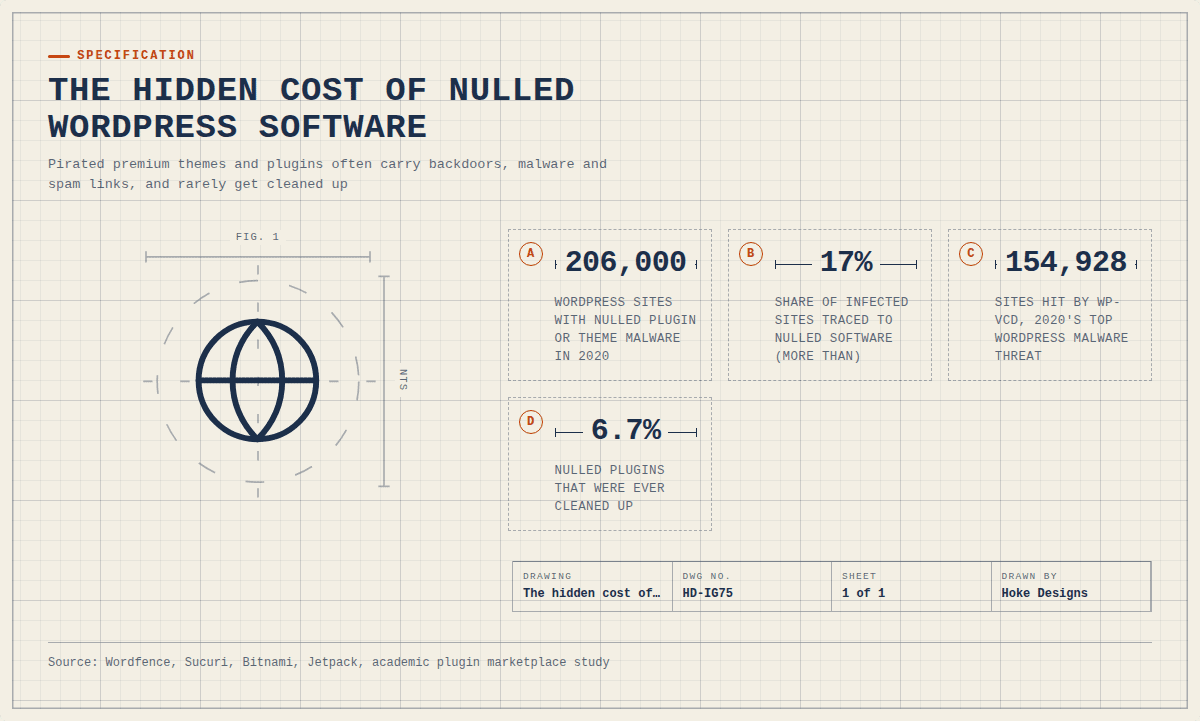
This infographic sums up the article on one page. Save it, share it with your team, or read on for the detail and the sources behind it.
In this article · 9 sections · 7 min
- 01What “nulled” actually means
- 02How common the problem is
- 03What hides inside a nulled download
- 04Why the damage tends to stick around
- 05Warning signs you may already have one
- 06What to do if you find nulled software
- 07Safer ways to get the features you need
- 08Why an expert matters for a public website
- 09Key takeaways
Downloading a nulled theme or pirated plugin is one of the fastest ways to hand control of your WordPress site to a stranger. These “free” copies of premium software very often carry hidden backdoors, malware or spam links, and the cost of cleaning up usually far exceeds the license fee you saved.
If you run a business website in Juneau, Sitka, Ketchikan or anywhere else, the appeal makes sense. A premium booking plugin or a polished theme can cost real money, and a site offering the same file for nothing looks like an easy win. Below is what security researchers have found inside these downloads, how to tell whether you already have one, and what to do next.
What “nulled” actually means
Wordfence describes nulled plugins and themes as pirated copies of premium plugins and themes with their license checks disabled or removed, and says these copies typically contain backdoor functionality. In other words, someone has already opened up the code and changed it before it reaches you. Whatever else they added comes along for the ride.
The quality is usually worse too. Wordfence notes that nulled plugins and themes usually lack full premium features and often contain backdoors and other malware. You also lose access to the developer’s updates and support, so any security fix the original author releases never reaches your copy.

How common the problem is
This is not a rare edge case. A few numbers from researchers:
- 206,000 sites: Wordfence’s 2020 threat report found malware from a nulled plugin or theme on 206,000 WordPress sites, more than 17% of all infected sites its scanner found that year.
- The top threat of 2020: WP-VCD malware, which spreads through nulled plugins and themes, was the most common malware threat to WordPress in 2020, found on 154,928 sites.
- More often than not: A large academic study of plugin marketplaces found that nulled plugins put malicious code on web servers more often than not, identifying 8,525 malicious nulled plugin instances.
- Popular names are targets: In that same study, about 75% of the malicious nulled plugins were copies of legitimate plugins sold on the 7 most popular marketplaces. The well-known name on the file offers no protection.
What hides inside a nulled download
Backdoors that give attackers remote access
A backdoor is code that lets someone get back into your site whenever they like, even after you change your password. Sucuri found one nulled-software site offering more than 2,500 pirated premium plugins and themes whose downloads included scripts that created a backdoor in the wp-content/mu-plugins folder. That folder holds “must-use” plugins, which load automatically and don’t appear in your normal plugin list, so a site owner can easily miss them.
Fast, site-wide takeover
Some infections spread before you’ve even finished setting up. Bitnami reported that with WP-VCD, once an infected theme or plugin was installed, the WordPress site was taken over within seconds, and a script added a backdoor to every installed theme file. Deleting the original download doesn’t fix that, because the malicious code has already copied itself elsewhere.
Code that switches off your defenses
You might assume a security plugin will catch the problem. Not always. Sucuri found a backdoor in a nulled theme that included a webshell able to disable popular WordPress security plugins installed on the site.

Hidden SEO spam
Some payloads are built to quietly damage your search reputation instead of locking you out. Sucuri found that a nulled copy of the Smart Grid Gallery plugin added a hidden div with links to outside websites to boost their search rankings. Visitors never see those links, but search engines do, and your site ends up promoting someone else’s pages.
Why the damage tends to stick around
Nulled software rarely gets fixed after the fact. The academic study found that only 6.7% of nulled plugins were ever cleaned up. A nulled install also seems to go hand in hand with wider trouble: Wordfence found that sites running a nulled copy of its own plugin were more than twice as likely to have unrelated infections as the average site running the free version.
For a business, that can mean search rankings falling off, browser warnings scaring off visitors, a host suspending your account, or customer data exposed through a booking or checkout form. Each of those is harder and more expensive to undo than buying a license.

Warning signs you may already have one
If a past developer, a relative or an earlier version of you built your site, run through this checklist:
- Unknown administrator accounts. Sucuri calls unexpected admin users a classic sign of a backdoor. Check Users > All Users and filter by Administrator.
- Premium plugins with no license record. If you can’t find a receipt or an account with the vendor, assume the copy may be nulled.
- Updates that never arrive. Premium tools that never show available updates, or that show license errors, deserve a closer look.
- Unfamiliar files in wp-content/mu-plugins. Ask your host or developer to check this folder if you aren’t comfortable doing so yourself.
- A security plugin that is suddenly deactivated or won’t stay turned on.
- Strange search results. Search site:yourdomain.com and look for pages or keywords you never created.
What to do if you find nulled software
- Back up first. Take a full copy of files and database so you have a record, even though it may contain the infection.
- Remove the nulled items. Sucuri advises site owners to delete them immediately and replace them with legitimate copies.
- Audit user accounts. Remove any administrator you don’t recognize and reset passwords for everyone who remains.
- Assume it spread. Because infections like WP-VCD copy themselves into other files, check every theme and plugin, not just the one you suspect.
- Change your other credentials. Update hosting, database, FTP or SFTP passwords and any API keys stored on the site.
- Get professional help if the signs persist. If admin accounts reappear or spam returns after cleanup, a backdoor is likely still in place, and this is the point to bring in someone experienced with WordPress malware.
Safer ways to get the features you need
- Use official sources for free software. Jetpack recommends sticking to the official WordPress plugin and theme directories, because those listings are monitored and checked for injected malware.
- Buy premium tools from the developer. You get updates, support and a clean, unmodified file.
- Keep fewer plugins. Each one is more code to maintain. If a free plugin or a bit of custom work covers the need, you shrink your risk.
- Keep records. Store license keys and receipts somewhere your team can find them, so whoever maintains the site knows what’s legitimate.
Why an expert matters for a public website
Nulled software is tricky because it is designed to look normal. Backdoors sit in folders most owners never open, spam links are invisible on the page, and some code can turn off the very tools meant to catch it. Spotting that takes someone who knows where WordPress hides things and who checks regularly, not just after something breaks.
At Hoke Designs, we’ve been building websites since 2007, and we design custom sites rather than relying on templates, which keeps the list of third-party code on a site short and known. If your site is hosted with us and something looks off, our support desk is the place to start.
Key takeaways
- Nulled themes and plugins are pirated premium software, and they very often contain backdoors.
- Researchers found nulled-software malware on more than 200,000 WordPress sites in a single year, and few nulled plugins are ever cleaned up.
- Payloads include remote-access backdoors, code that disables security plugins, and hidden SEO spam links.
- Watch for unknown admin accounts, unlicensed premium tools and odd search results.
- Delete nulled items, replace them with legitimate copies, audit users, and call in a professional if problems return.
If you’d like a second set of eyes on your site, call (424) 209-8199 or send a message via our contact form, and a person will reply within one business day.
Images are presented for illustration purposes only.We use real photographs when we need to show what was happening at a real event.
Keep reading
More on Security

Can a Hacked Site on Your Shared Server Infect Yours?
Yes, a compromised neighbor on shared hosting can reach your site through stolen credentials, direct database access and backdoors. We explain how cross-site contamination spreads, why…

Can a Trusted WordPress Plugin Turn Malicious? How Supply Chain Attacks Work
A WordPress plugin you've trusted for years can turn malicious through a routine update. We explain the three ways it happens: hijacked developer accounts, plugin sales…

Is a Security Plugin Enough to Protect Your WordPress Site?
A security plugin runs inside WordPress, so it can be bypassed. Here's why plugins carry 96% of new WordPress vulnerabilities, and the five layers that protect…
Hoke Designs
Questions about your own website?
Talk to the team that writes these articles and looks after dozens of sites every day. You’ll get a straight answer.