

Can a Hacked Site on Your Shared Server Infect Yours?
Yes, a compromised neighbor on shared hosting can reach your site through stolen credentials, direct database access and backdoors. We explain how cross-site contamination spreads, why WordPress sites are frequent targets, the warning signs to watch for, and a practical checklist for isolating your site.


At a glance
The short version
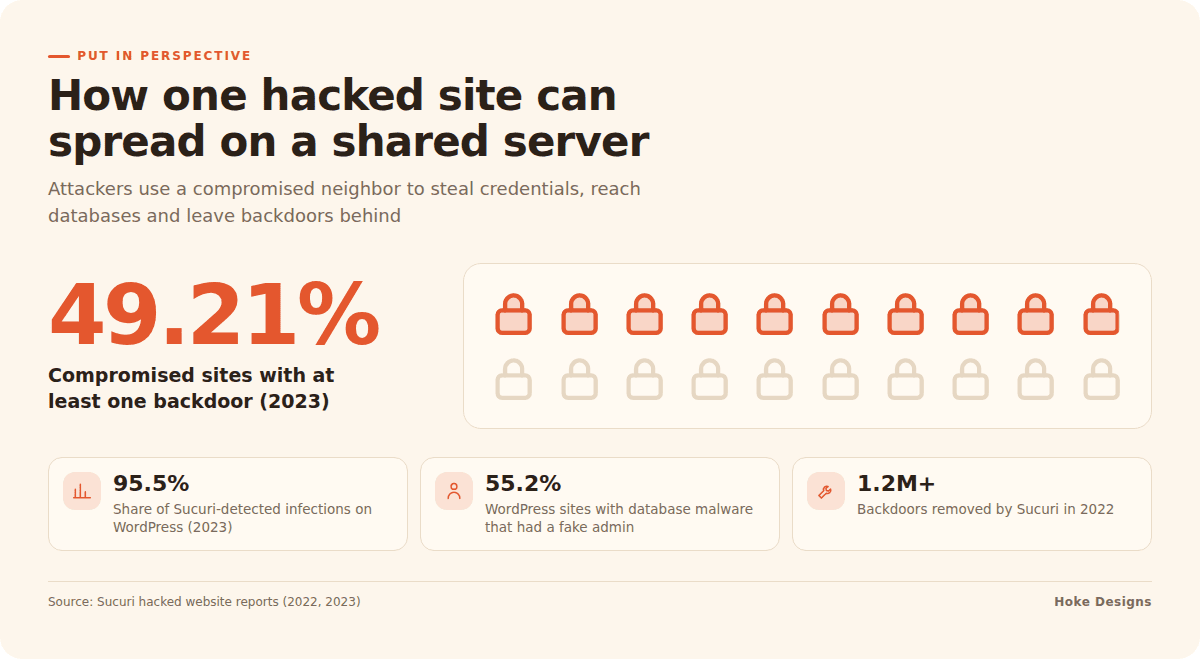
This infographic sums up the article on one page. Save it, share it with your team, or read on for the detail and the sources behind it.
In this article · 8 sections · 7 min
Yes, a hacked website on your shared server can infect yours, even if you have done everything right on your own site. On cheap or poorly configured shared hosting, sites often sit close enough together that an attacker who controls one can read, write or log into the others. You can reduce that risk with real account isolation, unique credentials, tight file permissions and a host that takes separation seriously.
The sections below explain how this kind of spread happens, why WordPress sites are frequent targets, and what you can do this week to protect yours.
What Cross-Site Contamination Means
When attackers use one compromised website to go after other sites on the same shared server, security firm Sucuri calls it cross-site contamination. Its summary is blunt: your website is only as safe as the weakest link on that server.
That weakest link might be a neighbor running a WordPress install that has not been updated in years, an abandoned plugin, or an admin password reused from a breached service. You do not choose your neighbors on shared hosting, and you usually cannot see what they are running.
How Malware Moves From One Site to the Next
Shared hosting puts many websites on one machine so they can share CPU, memory, storage and often the same database server. That arrangement is efficient. If the walls between accounts are thin, though, it also gives an attacker who gets into one site a starting point for reaching the rest.

Stealing credentials from neighbors
Every WordPress site stores its database username and password in wp-config.php. If an attacker can read other accounts’ files from a compromised site, those credentials are exposed. Sucuri describes how one hacked WordPress site can lead to thousands of victim sites when attackers use shared server resources to harvest credentials from the sites around it.
Connecting straight to your database
Many hosts restrict database connections to the local server or network. That is good practice in general, but it does not stop someone who is already on that server. Sucuri notes that attackers can connect to a WordPress database from the same server or network by using a site they have already compromised, without ever breaking into the target site first. Once inside your database, they can add an admin user or inject malicious code into your content.
Leaving backdoors behind
Attackers rarely settle for one way in. In its 2023 analysis, Sucuri found at least one backdoor on 49.21% of compromised websites. In 2022 the figure was 69.63%, with more than 1.2 million backdoors removed that year. A backdoor lets an attacker return after you think you have cleaned up, which is why an infection can keep coming back on a shared server.
Why WordPress Sites Are Frequent Targets
WordPress is popular, and popularity attracts attackers. Sucuri’s 2023 report, based on 39,594 sites cleaned by its incident response team and more than 108 million remote scans, found that WordPress accounted for 95.5% of infections it detected while holding 62.8% of the CMS market. Some of that gap reflects how many WordPress sites Sucuri cleans. Even so, the takeaway is the same: WordPress sites draw a lot of attention.
Some of the news is encouraging. Sucuri reports that automatic updates have greatly reduced exploits of core WordPress vulnerabilities. Most of the remaining risk sits in plugins, themes, weak credentials and the hosting environment itself.
Warning Signs Your Site May Be Affected
Database-level infections are common in contamination cases. In 2023, 55.2% of WordPress sites with database malware had at least one malicious admin user, and over 70% of database malware sat in the wp_options and wp_posts tables. In 2022, Sucuri found malicious admins in 32.69% of infected databases, using more than 18,000 unique usernames.
Check for these signs:
- Administrator accounts you do not recognize under Users
- Strange scripts, links or spam text in posts and pages
- Visitors being redirected to unfamiliar sites, especially on mobile
- Search results showing spammy titles or pages you never created
- Unexplained PHP files in your uploads folder or site root
- Browser or Google warnings that your site is unsafe
- Malware that returns soon after you clean it
How to Isolate Your Site: A Practical Checklist
You cannot secure your neighbors’ sites, but you can make yours a much harder target and limit what a compromised neighbor can reach.
Ask your host the right questions
- Is each account isolated? Ask whether accounts run under separate system users with separate PHP processes, or inside containers or jailed environments, so one account cannot read another’s files.
- Is the database access restricted per account? Each site should have its own database user that can reach only its own database.
- Is server software kept current? Outdated PHP, web server or control panel software weakens every site on the machine.
- What happens when a neighbor is hacked? A good host detects and contains infected accounts quickly.
Lock down your own site
- Use unique credentials everywhere. Give your database, WordPress admin, hosting panel and SFTP each a different, strong password, and turn on two-factor authentication where you can.
- Tighten file permissions. Folders are typically 755 and files 644.
wp-config.phpshould be more restrictive, such as 640 or 600, depending on how your host runs PHP. Ask your host before you change these settings. - Change the default table prefix and security keys on new installs, and regenerate the salts in
wp-config.phpafter any suspected breach. - Keep everything updated. Update WordPress core, plugins and themes. Delete any you are not using rather than just deactivating them.
- Disable file editing in the dashboard by adding
define('DISALLOW_FILE_EDIT', true);towp-config.php. - Audit admin users monthly and remove any account you cannot account for.
- Keep off-server backups so you can restore a clean copy that lives outside the shared environment.
For more hardening steps, the WordPress project maintains a hardening guide worth bookmarking.

When to Move Off Shared Hosting
Shared hosting can work for small, low-risk sites on a well-run server. Consider moving to managed, isolated, VPS or dedicated hosting if any of these apply:
- Your site takes payments, bookings or customer data.
- You have been reinfected after a cleanup.
- Your host cannot clearly explain how it isolates accounts.
- Downtime or a blacklist warning would cost you real business.
If you are unsure, have a professional review your setup before you migrate. A move alone will not help if you carry a backdoor with you.
Why Expert Care Matters
Cross-site contamination is hard to fix on your own. The source may be on an account you cannot see, and backdoors are built to survive a casual cleanup. Removing malicious admins, cleaning database tables, rotating every credential and confirming the server itself is sound takes experience and the right access.
At Hoke Designs, we have been designing websites since 2007, and we offer managed hosting alongside design and development, so the people who build your site can help care for where it lives. If you are an existing client with a concern, you can reach Nikol and our team through our support desk.
Key Takeaways
- On shared hosting, your site is only as safe as the weakest site on the server.
- Attackers spread by stealing neighbors’ credentials, reaching databases from inside the server and planting backdoors.
- Watch for unknown admin users, injected content, redirects and repeat infections.
- Choose a host with real account isolation, use unique credentials, tighten permissions and keep everything updated.
- Sites that handle money or data, or keep getting reinfected, need isolated hosting and expert care.
If you would like a second set of eyes on your hosting, call (424) 209-8199 or send a message via the contact form, and a person will reply within one business day.
Images are presented for illustration purposes only.We use real photographs when we need to show what was happening at a real event.
Keep reading
More on Security

Can a Trusted WordPress Plugin Turn Malicious? How Supply Chain Attacks Work
A WordPress plugin you've trusted for years can turn malicious through a routine update. We explain the three ways it happens: hijacked developer accounts, plugin sales…

Is a Security Plugin Enough to Protect Your WordPress Site?
A security plugin runs inside WordPress, so it can be bypassed. Here's why plugins carry 96% of new WordPress vulnerabilities, and the five layers that protect…

How to Read a WordPress Vulnerability Report and Patch Fast
Serious WordPress flaws can be exploited within hours of disclosure. Here's how to read an advisory, what a CVSS score does and doesn't tell you, what…
Hoke Designs
Questions about your own website?
Talk to the team that writes these articles and looks after dozens of sites every day. You’ll get a straight answer.