

Is a Security Plugin Enough to Protect Your WordPress Site?
A security plugin runs inside WordPress, so it can be bypassed. Here's why plugins carry 96% of new WordPress vulnerabilities, and the five layers that protect your site: an edge firewall, file integrity monitoring, server hardening, plugin hygiene and tested backups.


At a glance
The short version
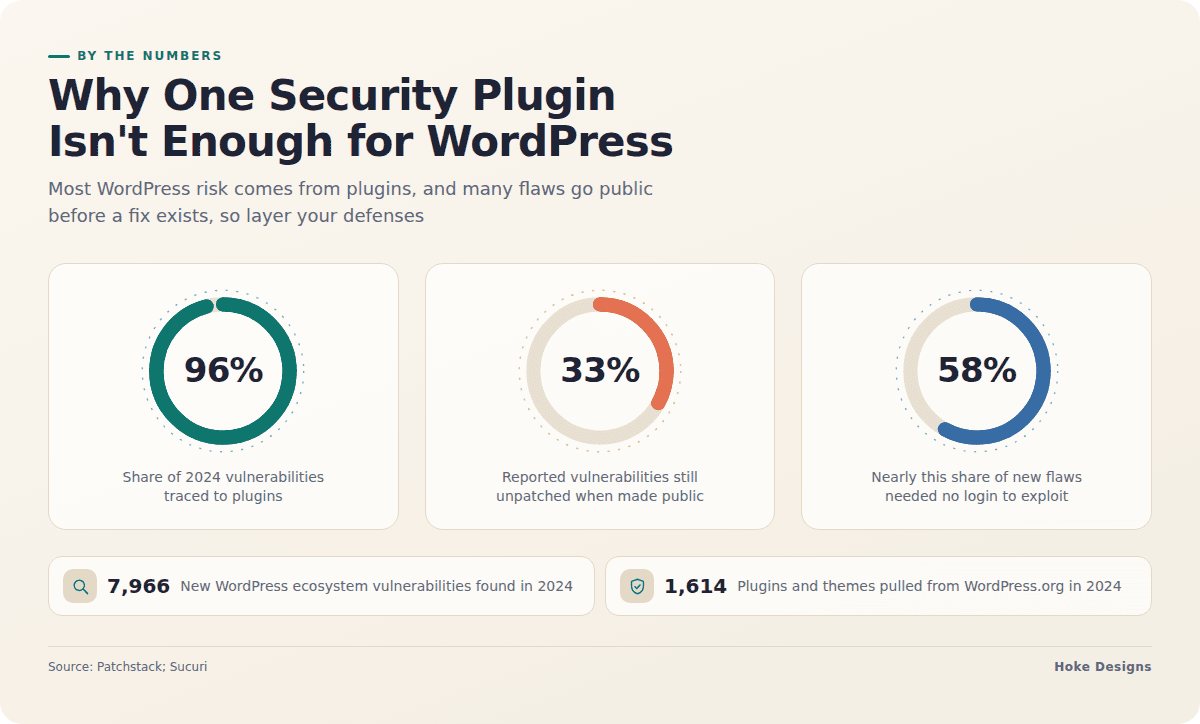
This infographic sums up the article on one page. Save it, share it with your team, or read on for the detail and the sources behind it.
In this article · 9 sections · 6 min
- 01Why a single plugin can’t do it all
- 02What you’re defending against
- 03Layer 1: A web application firewall
- 04Layer 2: File integrity monitoring
- 05Layer 3: Server hardening
- 06Layer 4: Plugin, theme and account hygiene
- 07Layer 5: Backups you’ve actually tested
- 08When to bring in a professional
- 09Key takeaways
No, a security plugin alone won’t keep your WordPress site safe. It is a useful layer, but real protection comes from stacking several defenses so that when one misses something, another catches it: a web application firewall, file integrity monitoring, a hardened server, careful plugin habits and reliable backups.
Below you’ll find why one plugin can’t carry the whole load, what each layer does, and a checklist you can work through on your own site.
Why a single plugin can’t do it all
A security plugin runs inside WordPress, so it shares the same environment it is trying to protect. If an attacker gets code running on your site, that code can work around or disable the plugin. Patchstack’s 2025 report found that malware can get past WordPress malware-scanning plugins. A scanner only recognizes what it has been taught to look for.

Generic protection has gaps too. Patchstack notes that many hosting providers and third-party tools handle generic threats like bot traffic, basic SQL injection and XSS patterns, and DDoS well. WordPress-specific logic flaws, privilege escalation bugs and some file-handling vulnerabilities often slip past those same controls. No single tool covers every route in, and that is the reason to layer your defenses.
What you’re defending against
Most WordPress risk comes from the add-ons you install, not from WordPress itself. In 2024, 7,966 new security vulnerabilities were found in the WordPress ecosystem, and Patchstack traced 96% of them to plugins and 4% to themes. In the first half of 2025, researchers found 3,044 vulnerabilities in plugins, 386 in themes and only one in WordPress core, across components with a combined 56 million active installs.
Several other findings explain why waiting for updates isn’t enough:

- Fixes often arrive late. More than half of the plugin developers Patchstack contacted in 2024 did not release a fix before public disclosure, and 33% of reported vulnerabilities were still unpatched when made public.
- Popular doesn’t mean safe. In 2024, more than 1,000 vulnerabilities were found in plugins with over 100,000 active installs, including severe flaws in LiteSpeed Cache, Really Simple SSL, Better Search Replace and The Events Calendar.
- Many flaws are easy to exploit. Patchstack’s mid-year report found that 41.5% of the 6,700 new vulnerabilities reported could be exploited in real-world conditions, and nearly 58% required no authentication. Flaws that need no login are the ones automated, large-scale attacks go after.
- Hygiene matters as much as patching. Patchstack and Sucuri report that vulnerabilities in core, plugins and themes account for nearly half of all malware infections. They tie the rest to poor security hygiene, such as weak passwords, sloppy access control and neglected sites.
Layer 1: A web application firewall
A web application firewall (WAF) inspects incoming requests and blocks malicious ones before they reach WordPress. The best place for it is in front of your site, at the hosting or network edge, rather than only inside a plugin. An edge firewall can stop bad traffic before PHP ever runs.
- Use a firewall at the host or DNS/CDN level if one is available.
- Add rate limiting to the login page and to
xmlrpc.php, or disable XML-RPC if you don’t use it. - Look for WordPress-aware rules or virtual patching. Generic rules miss the logic and privilege flaws described above.
Layer 2: File integrity monitoring
File integrity monitoring answers a simple question: has anything changed that shouldn’t have? It compares your files against known-good versions and alerts you to new, modified or unexpected files. It works even when malware is new enough that scanners don’t recognize it yet.

- If you have WP-CLI, run
wp core verify-checksumsandwp plugin verify-checksums --allto check files against the official WordPress.org copies. - Watch for PHP files in
wp-content/uploads. That folder should hold media, not code. - Have the monitoring run at the server level and send alerts off the server, so a compromised site can’t silence it.
Layer 3: Server hardening
Hardening shrinks what an attacker can reach and limits the damage if they get in. This is the layer DIY and budget shared hosting most often skips. Work through these steps:
- Run a supported PHP version and keep the operating system and web server patched.
- Set sensible file permissions. Typically 644 for files and 755 for folders, with
wp-config.phptighter (often 640 or 600). The right values depend on how your server runs PHP, so check with your host. - Turn off the built-in file editor by adding
define('DISALLOW_FILE_EDIT', true);towp-config.php. - Use SFTP or SSH keys instead of plain FTP, and remove old accounts.
- Give the database user only the privileges WordPress needs, and use a unique password for it.
- Block PHP execution in the uploads folder at the web-server level.
- Isolate sites from each other. On shared accounts, one infected site can spread to every other site on the same account.
Layer 4: Plugin, theme and account hygiene
Because plugins carry most of the risk, every one you remove is one less thing that can be exploited. Note that 1,614 plugins and themes were removed from the WordPress.org repository in 2024 for unpatched security issues, and abandoned plugins are not flagged to you even when they’ve been pulled for security reasons. You have to check for them yourself.
- Every quarter, delete any plugins and themes you don’t use. Deactivating them is not enough.
- For each plugin you keep, check its listing for recent updates. If it has disappeared from the repository, find a replacement.
- Require strong, unique passwords and two-factor authentication for every admin.
- Give each user the lowest role that lets them do their job.
Layer 5: Backups you’ve actually tested
Backups are your last line of defense. If the other layers fail, a clean backup lets you recover quickly. Store copies off the server, keep several restore points so you can roll back to before an infection began, and do a test restore now and then. A backup you’ve never restored is a backup you can’t be sure of.

When to bring in a professional
Plenty of these steps are within reach for a careful site owner. Others, like server-level hardening, firewall tuning and cleaning up after a compromise, take server access and experience that most businesses don’t have in-house. They also aren’t one-time jobs. New vulnerabilities appear every week, so someone needs to watch, update and respond on an ongoing basis.
For a business site that takes bookings, sells products or represents your reputation, it is usually worth having an expert own this work. Hoke Designs has built websites since 2007 and offers managed hosting from our studio in Juneau. If you’re a current client with a question, our support desk is the place to start. Whoever you work with, ask them directly which of the layers above they handle and which ones are left to you.
Key takeaways
- A security plugin is one layer. It runs inside WordPress and can be bypassed.
- Plugins account for 96% of new WordPress vulnerabilities, and many go public before a fix exists.
- Put a firewall in front of your site, monitor file changes, and harden the server itself.
- Remove unused or abandoned plugins. WordPress won’t warn you about them.
- Keep tested, off-site backups, and get expert help for the parts you can’t maintain yourself.
If you’d like a hand with your site’s security, call (424) 209-8199 or send a message through our contact form, and a person will reply within one business day.
Images are presented for illustration purposes only.We use real photographs when we need to show what was happening at a real event.
Keep reading
More on Security

How to Read a WordPress Vulnerability Report and Patch Fast
Serious WordPress flaws can be exploited within hours of disclosure. Here's how to read an advisory, what a CVSS score does and doesn't tell you, what…

How Card Skimmers Hide in WordPress Checkouts and Booking Forms
Magecart-style skimmers can copy every card typed into a WooCommerce or booking checkout while orders keep going through normally. This guide explains how they get in…

Forgotten WordPress Files That Leak Your Passwords: A Cleanup Checklist
Leftover files like debug.log, wp-config.php backups, exposed .git folders and old staging sites can hand attackers your database password without any hacking skill. This guide explains…
Hoke Designs
Questions about your own website?
Talk to the team that writes these articles and looks after dozens of sites every day. You’ll get a straight answer.