

Is Your WordPress Site Running on Outdated PHP or MySQL?
Updating WordPress and your plugins won't fix security gaps in the server software underneath. PHP 8.1 and older and MySQL 8.0 have reached end of life, and PHP 8.2 support ends after 31 December 2026. Here's how to check what your site runs on and how to upgrade safely.


At a glance
The short version
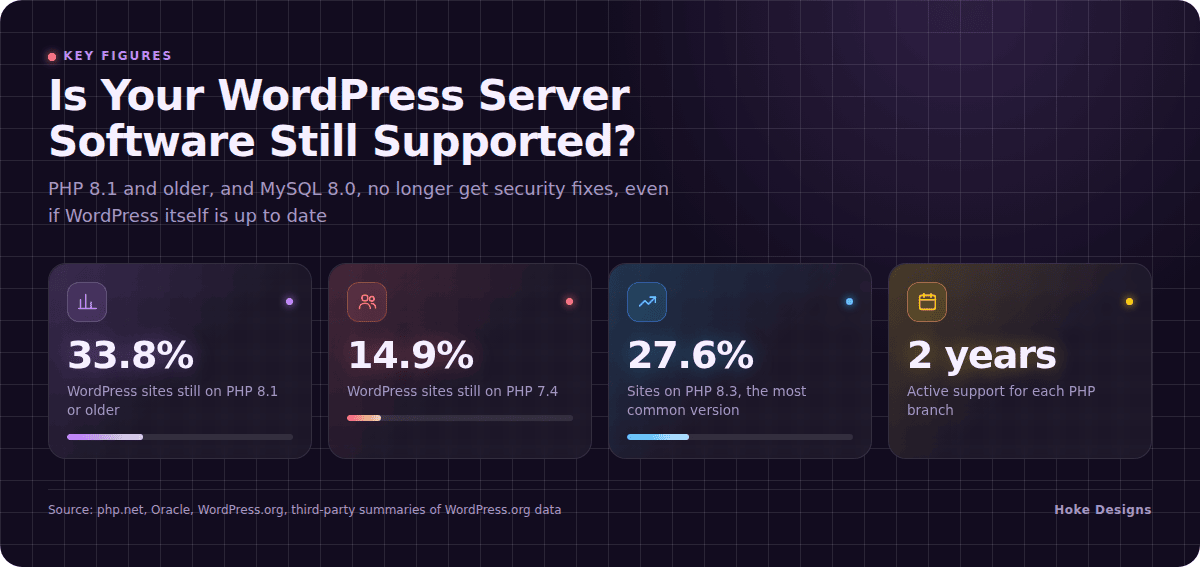
This infographic sums up the article on one page. Save it, share it with your team, or read on for the detail and the sources behind it.
In this article · 10 sections · 7 min
- 01What “end of life” actually means for PHP
- 02Why updating WordPress isn’t enough
- 03How common is this problem?
- 04Your database can expire too
- 05What WordPress recommends
- 06The rest of the server stack
- 07How to check what your site is running
- 08How to upgrade without breaking your site
- 09Why an expert should own this
- 10Key takeaways
If your WordPress site runs on PHP 8.1 or older, or on MySQL 8.0, it depends on software that no longer receives security fixes. Updating WordPress, your theme and your plugins won’t close those gaps. To protect the site, check your server versions and plan a move to a supported PHP release and a current database.
Most site owners never see the software their site runs on, which is why this risk is easy to miss. Below, we explain what “end of life” means, which versions are affected, how to check your own setup, and how to upgrade without breaking anything.
What “end of life” actually means for PHP
PHP is the programming language WordPress is written in. Your host runs a particular version of it, and each version has a fixed support window. Each PHP branch gets two years of active support, then two years of critical security fixes only. After that, the PHP project stops patching it. New vulnerabilities can still be discovered in it, but they will never be fixed.

As of late 2026, php.net lists PHP 8.2, 8.3, 8.4 and 8.5 as supported, while PHP 8.1 and every earlier branch, including all 5.x, 7.x and 8.0 releases, are end of life. Here are the dates for the versions you are most likely to find on an older site:
- PHP 7.4 reached end of life on 28 November 2022.
- PHP 8.0 reached end of life on 26 November 2023.
- PHP 8.1 reached end of life on 31 December 2025.
The currently supported versions also have expiration dates. PHP 8.2 stops receiving security fixes after 31 December 2026, PHP 8.3 reaches end of life after 31 December 2027, and PHP 8.4 has security fixes until 31 December 2028. If you are on 8.2 right now, you are only just inside the window.
Why updating WordPress isn’t enough
Many owners assume that clicking “Update” on everything in the dashboard keeps the site secure. That habit matters, but it only covers the top layer. Running PHP 7.4 leaves a site exposed to unpatched vulnerabilities even if WordPress core and plugins are kept up to date. Your plugins can be fully current and still run on a language engine with known, unfixed flaws.

WordPress won’t warn you loudly about this either. PHP 7.4 is still the minimum version WordPress 7.0 accepts. That keeps older sites from breaking, but it also means “WordPress runs fine” tells you nothing about whether your server is still getting security fixes.
How common is this problem?
It is very common. According to a third-party summary of WordPress.org data, 14.9% of WordPress sites still run PHP 7.4, more than three years after its security support ended. Another 2026 roundup reports that 33.8% of WordPress sites still run PHP 8.1 or older. Roughly one in three WordPress sites, then, is running a PHP version with no security fixes.
There is good news too. The same summary says PHP 8.3 is the most common version, on 27.6% of sites, so a large share of the ecosystem has already moved forward. Most well-maintained plugins and themes now expect a modern PHP version.
Your database can expire too
WordPress stores your posts, pages, users and settings in a MySQL or MariaDB database, and those products have support lifecycles of their own. Oracle ended official support for MySQL 8.0 in April 2026, and after that date MySQL 8.0 gets no security patches, bug fixes or technical support from Oracle. Specifically, MySQL 8.0 reached end of life on April 30, 2026, and its last release was 8.0.46.
The usual next step is MySQL 8.4 LTS, released April 30, 2024, which has Premier Support until April 30, 2029. MariaDB is another option.
What WordPress recommends
WordPress.org publishes hosting recommendations. They are the best single reference for what “current” means. WordPress.org recommends that hosts support PHP 8.3 or greater, and MariaDB 10.11 or greater or MySQL 8.4 or greater. It also requires HTTPS for every install.
A practical target for most sites today:

- PHP: 8.3 or newer
- Database: MySQL 8.4 or MariaDB 10.11 or newer
- HTTPS: a valid SSL/TLS certificate that renews automatically
The rest of the server stack
PHP and the database are the parts people talk about most, but a server has other layers. These include the operating system, the web server software (such as Apache or Nginx), the encryption libraries behind HTTPS, and admin tools like control panels. Any of them can fall out of support. This is a particular risk on DIY setups, such as a virtual server you configured once and haven’t revisited, or an old shared hosting plan nobody has looked at in years. On shared or managed hosting, most of these layers are your host’s job. On a self-managed server, they are yours.
How to check what your site is running
- Use Site Health. In your WordPress dashboard, go to Tools → Site Health → Info and open the Server and Database sections. You’ll see your PHP version and database type and version.
- Check your hosting control panel. Many hosts show the PHP version and let you switch it per site.
- Compare against the dates above. Anything at PHP 8.1 or below, or MySQL 8.0, needs attention now. PHP 8.2 needs a plan before the end of 2026.
- Ask your host directly. If you can’t find the information, ask your host which PHP, database and operating system versions your account uses, and when they plan to upgrade.
How to upgrade without breaking your site
Jumping several PHP versions at once can break old plugins or custom code. A careful sequence lowers the risk:
- Take a full backup of both files and database, and confirm you can restore it.
- Use a staging copy if your host offers one, so you test on a duplicate rather than the live site.
- Update WordPress, themes and plugins first. Newer releases are more likely to support newer PHP.
- Remove abandoned plugins and themes. If a plugin hasn’t been updated in years, it may not run on PHP 8.3. Look for an actively maintained replacement.
- Switch PHP on staging and test the key paths. Check forms, checkout, booking calendars, logins and search.
- Check the error log for warnings after the switch.
- Apply the change to the live site at a quiet time, and keep the rollback option ready.
Timing matters if your business is seasonal. For tourism, marine and event businesses in Southeast Alaska, the shoulder or winter season is usually a safer time to upgrade than the middle of cruise season, when your booking pages are busiest. Custom-built sites, or sites with heavily modified themes, may need a developer to review the code before upgrading. If your site has payments or customer accounts, that review is worth the cost.

Why an expert should own this
Server software doesn’t announce when it expires. A site can look fine for years while its foundation quietly stops receiving fixes. Keeping a public site secure means tracking lifecycle dates for PHP, the database and the operating system, testing upgrades before they reach the live site, and fixing compatibility problems when they appear. That ongoing work is easy for a busy business owner to put off, and expensive to neglect.
At Hoke Designs, we’ve been designing websites since 2007, and we offer managed hosting alongside design and development, so one team can handle both the site and the server it runs on. If you’re not sure what your site is running on, our support desk is a good place to start. If you manage your own hosting, the checklists above will help you stay on top of it.
Key takeaways
- PHP 8.1 and older, and MySQL 8.0, no longer receive security fixes.
- PHP 8.2 support ends after 31 December 2026. Plan your move to 8.3 or newer now.
- Updating WordPress and plugins doesn’t protect you from flaws in outdated server software.
- WordPress.org recommends PHP 8.3+, MySQL 8.4+ or MariaDB 10.11+, and HTTPS.
- Check your versions under Tools → Site Health, then upgrade with a backup, a staging test and a rollback plan.
If you’d like help checking or upgrading your server, send us a message via the contact form or call (424) 209-8199, and a person will reply within one business day.
Images are presented for illustration purposes only.We use real photographs when we need to show what was happening at a real event.
Keep reading
More on Security

Can a Hacked Site on Your Shared Server Infect Yours?
Yes, a compromised neighbor on shared hosting can reach your site through stolen credentials, direct database access and backdoors. We explain how cross-site contamination spreads, why…

Can a Trusted WordPress Plugin Turn Malicious? How Supply Chain Attacks Work
A WordPress plugin you've trusted for years can turn malicious through a routine update. We explain the three ways it happens: hijacked developer accounts, plugin sales…

Is a Security Plugin Enough to Protect Your WordPress Site?
A security plugin runs inside WordPress, so it can be bypassed. Here's why plugins carry 96% of new WordPress vulnerabilities, and the five layers that protect…
Hoke Designs
Questions about your own website?
Talk to the team that writes these articles and looks after dozens of sites every day. You’ll get a straight answer.