
How Social Engineering Tricks Smart People and How to Stop It
Social engineering works by exploiting trust, authority and urgency, so being smart offers little protection. This guide shows how phishing emails, fake support calls, smishing texts and MFA fatigue target website owners and Alaska businesses. It also gives you the habits, account settings and response steps that stop these scams.


At a glance
The short version
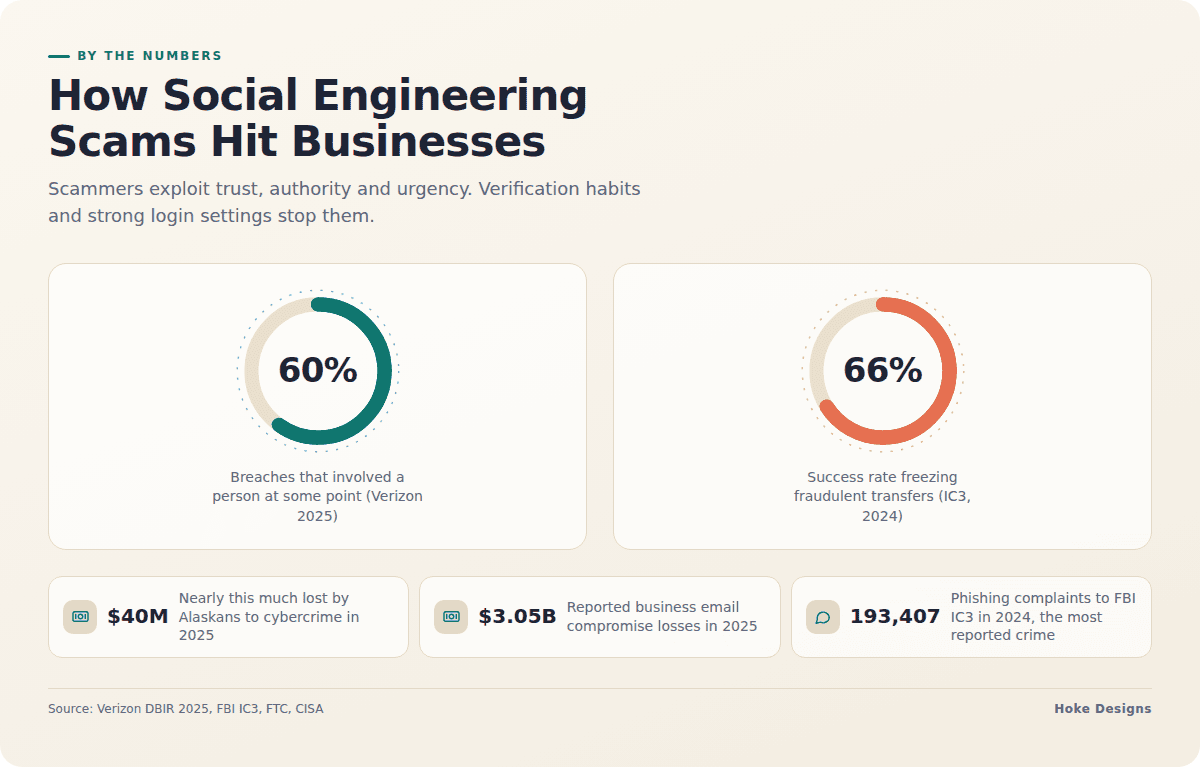
This infographic sums up the article on one page. Save it, share it with your team, or read on for the detail and the sources behind it.
In this article · 10 sections · 8 min
- 01What social engineering is, and why it works
- 02Why this matters for Alaska businesses
- 03The emails: phishing and business email compromise
- 04The calls: voice scams and fake tech support
- 05The texts: smishing
- 06The newer trick: MFA fatigue
- 07How to stop social engineering: a practical checklist
- 08If you’ve already been tricked
- 09Why an expert in your corner helps
- 10Key takeaways
Social engineering tricks smart people because it targets how people respond to trust, authority and urgency, and intelligence offers little protection against that. The most reliable defense is a set of habits and settings: you verify any request involving money, logins or access through a channel you already trust, and you use login protections that a rushed click can’t defeat.
The sections below cover how these scams work, what they look like when they target website owners, and what you can put in place this week.
What social engineering is, and why it works
Social engineering means manipulating a person into doing something that helps an attacker. The person might send a payment, share a password, approve a login or install something. The attacker doesn’t need to break your website or your firewall when someone with access can be persuaded to open the door.

The numbers show how often this happens. Verizon’s 2025 Data Breach Investigations Report found that 60% of breaches involved a person at some point in the attack, through social engineering, errors or misused credentials, and social engineering actions appeared in 24% of breaches. Phishing was the most reported cybercrime to the FBI’s Internet Crime Complaint Center (IC3) in 2024, with 193,407 complaints.
These scams work because they are designed to get you acting before you think. Most of them lean on the same few levers:
- Urgency: “Your account will be suspended in 24 hours.”
- Authority: a message that appears to come from your boss, your bank, your host or a government agency.
- Familiarity: a vendor you really do work with, an invoice that looks routine, a name you recognize.
- Helpfulness: a caller who “just needs to confirm” something so they can fix a problem for you.
Why this matters for Alaska businesses
Being remote doesn’t keep you out of reach. Alaskans lost nearly $40 million to cybercrime in 2025, $13.6 million more than in 2024, and the FBI’s Anchorage office called it the highest loss ever reported in Alaska for these crimes. Business email compromise was one of the categories with the largest losses in the state. A year earlier, Alaskans filed 6,770 complaints with IC3 and reported more than $26 million in losses.
The national picture follows the same trend. The FBI’s 2025 report recorded 1,008,597 complaints and $20.877 billion in reported losses, up 26% from 2024, with business email compromise the second-largest loss category after investment fraud.

Many businesses here run lean. Seasonal staff, owners doing several jobs at once and remote vendors all mean that requests often arrive by email or phone from people you rarely meet. Attackers build their scams around that kind of routine.
The emails: phishing and business email compromise
Email is still the main channel for these attacks. Business email compromise (BEC) alone caused $3.05 billion in reported losses across 24,768 complaints in 2025, up from $2.77 billion in 2024.
Common versions to watch for
- Changed payment details: a “vendor” or contractor writes to say their bank account has changed. In construction, real estate and tourism, where deposits and progress payments are routine, this request can look completely normal.
- The executive request: a short, urgent note from “the owner” asking for gift cards, a wire transfer or a file.
- Fake website and hosting notices: “Your domain is expiring,” “Your hosting account is suspended” or “Your SSL certificate failed,” with a link to a login page that copies the real one.
- Fake WordPress alerts: messages claiming a security patch or plugin update needs your admin login, or asking you to install a “fix” from an attachment or link. Real updates come through your WordPress dashboard or your developer. They don’t arrive as emailed files.
- Shared document lures: “You have a new document” links that lead to a credential-harvesting page.
The calls: voice scams and fake tech support
Phone scams work because a real voice feels trustworthy, and a caller can respond to your hesitation in the moment. Watch for:

- Callers claiming to be from your web host, domain registrar or a well-known software company who “noticed a problem” with your site.
- Requests to read back a code that was just texted to you. Those codes exist so that only you can log in, and a legitimate support agent will never need yours.
- Pressure to install remote-access software “so we can fix it.”
- Calls that follow up on a phishing email to make it seem more legitimate.
The texts: smishing
Text scams are short, they show up on the phone that’s always in your hand, and they are hard to inspect. According to FTC data, consumers reported losing $470 million to text message scams in 2024. Across all fraud types, the FTC’s Consumer Sentinel Network recorded a record $15.9 billion in reported losses in 2025, up from $12.5 billion in 2024.
Typical lures include package delivery problems, unpaid tolls, bank “fraud alerts” and account lockouts. Each one contains a link that is easy to tap on a small screen.
The newer trick: MFA fatigue
Multi-factor authentication (MFA) is essential, but attackers have found ways to work around some forms of it. CISA describes “MFA fatigue,” also called “push bombing,” as flooding a user with push notifications until they approve one by accident or out of annoyance. The 2025 Verizon report also named phishing and MFA bypass tactics such as prompt-bombing as top attack techniques.
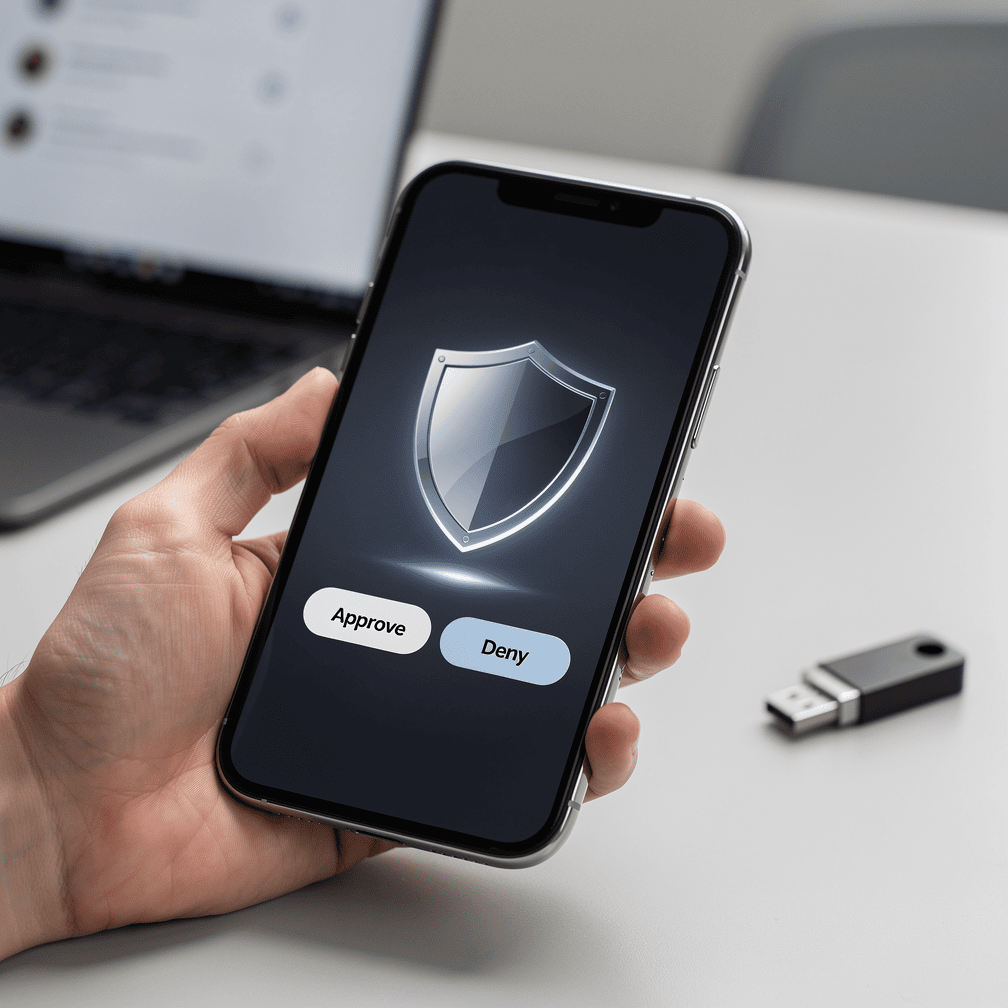
If you get a login approval request you didn’t trigger, deny it. Treat it as a sign that someone already has your password, and change that password right away.
How to stop social engineering: a practical checklist
Habits for everyone on your team
- Verify through a separate channel. If you get a request to change payment details, send money or share access, call the person back on a number you already have. Don’t use a number from the message itself.
- Slow down when you feel urgency. Pressure to act immediately is the clearest warning sign these scams have.
- Go to the site yourself. Type your host’s or registrar’s address into the browser or use a saved bookmark. Don’t click the link in a notice.
- Never share codes or passwords with anyone who contacts you first, whoever they say they are.
- Report, don’t just delete. Tell whoever manages your IT or website. One reported email can protect everyone else.
Settings that hold up even when someone clicks
- Use phishing-resistant MFA where you can. CISA warns that some forms of MFA can be beaten by phishing, push bombing, SS7 exploits or SIM swaps, and strongly urges organizations to use phishing-resistant MFA, such as security keys or passkeys.
- Turn on number matching in authenticator apps. CISA recommends it to counter push bombing.
- Limit WordPress administrator accounts. Give staff the lowest role that lets them do their job, such as Editor or Author, so one stolen login can’t take over the whole site.
- Protect your email, domain registrar and hosting accounts with unique passwords and MFA. Whoever controls your email can usually reset everything else.
- Write down a payment-change policy that requires a phone confirmation before any banking details are updated.
Train regularly, not once
Training makes a measurable difference. Organizations that trained employees regularly saw them report phishing four times as often. Short refreshers each season, especially when new seasonal staff start, work better than a single session.
If you’ve already been tricked
Speed matters most here, so don’t wait for certainty that it was a scam. The FBI advises victims, including businesses, to immediately notify every financial institution involved, file a complaint at www.ic3.gov, and contact the nearest FBI field office and local law enforcement.
Fast reporting can recover money. The IC3 Recovery Asset Team works with banks to freeze fraudulent transfers through the Financial Fraud Kill Chain, with a 66% success rate listed in the 2024 report.

If a login was exposed, change that password, sign out all active sessions, review your website’s user accounts for any you don’t recognize, and check for recent changes to plugins, themes or files. For anything beyond basic cleanup, bring in a professional. A compromised site can hide backdoors that survive a simple password change.
Why an expert in your corner helps
Social engineering often targets website owners because a site touches so many valuable accounts: email, domains, hosting, payment processors and customer data. When someone knowledgeable manages your hosting and security, you know who will actually contact you about your site, and a suspicious “renewal notice” can be checked quickly. At Hoke Designs, we have designed websites since 2007 and offer managed hosting. Our clients can reach our support desk when a message doesn’t feel right.
Key takeaways
- Social engineering exploits trust and urgency, so intelligence is no protection on its own.
- Alaska cybercrime losses hit a record in 2025, and business email compromise was among the costliest categories.
- Verify money and access requests through a channel you already trust, and never share login codes.
- Use phishing-resistant MFA or number matching, and keep WordPress admin roles to a minimum.
- If you’re hit, contact your bank, IC3 and law enforcement right away, because quick reports can stop transfers.
If you’d like help checking your site’s security, call (424) 209-8199 or send a message via the contact form, and a person will reply within one business day.
Images are presented for illustration purposes only.We use real photographs when we need to show what was happening at a real event.
Keep reading
More on Security

Is That Email Really From Them? Spotting Spoofed Senders
A familiar name in the "From" line doesn't prove an email came from that business. Learn how display-name spoofing, look-alike domains and hijacked accounts work. Then…

Six Security Gaps in DIY Website Hosting and How to Close Them
Self-hosted sites rarely fail from dramatic hacks. Instead, routine work stops happening: plugin updates, server patches, login cleanup, certificate renewals and offsite backups. We walk through…

Abandoned WordPress Plugins: How to Find and Fix Them
Most WordPress vulnerabilities are in plugins and themes, not core, and an abandoned plugin will never get the fix it needs. Your dashboard may not even…
Hoke Designs
Questions about your own website?
Talk to the team that writes these articles and looks after dozens of sites every day. You’ll get a straight answer.