
Abandoned WordPress Plugins: How to Find and Fix Them
Most WordPress vulnerabilities are in plugins and themes, not core, and an abandoned plugin will never get the fix it needs. Your dashboard may not even warn you when one is pulled. This article covers why add-ons carry the risk, why paid and nulled plugins aren't safe by default, and how to audit and harden your own site step by…


At a glance
The short version
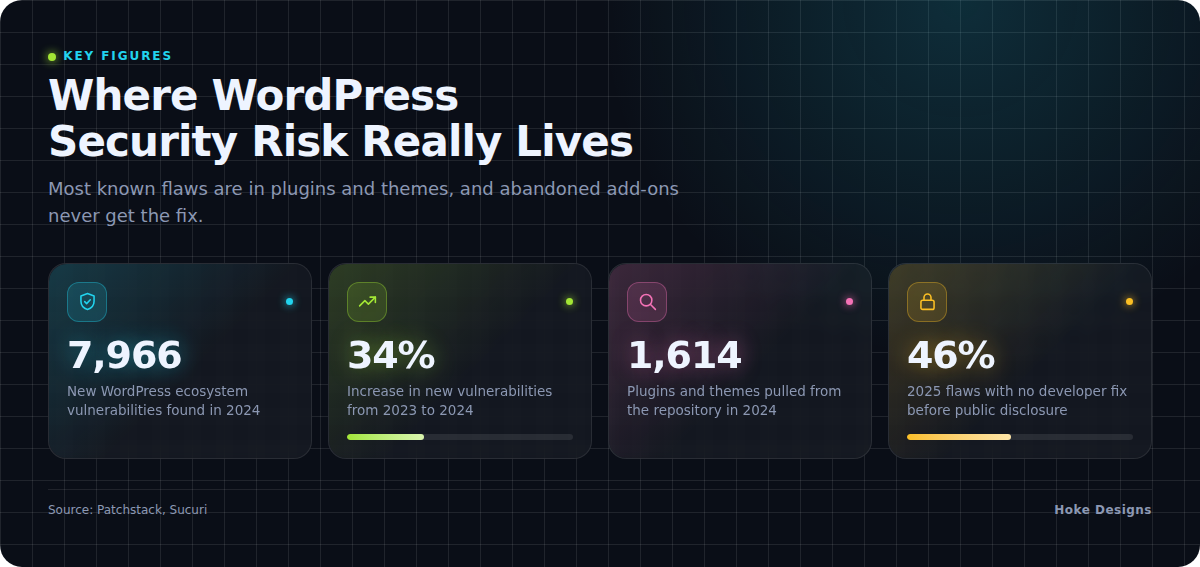
This infographic sums up the article on one page. Save it, share it with your team, or read on for the detail and the sources behind it.
In this article · 9 sections · 8 min
- 01Why Plugins and Themes Are Where the Risk Lives
- 02What “Abandoned” Means, and Why Your Dashboard May Stay Quiet
- 03A Real Example: The Eval PHP Plugin
- 04Paid Plugins and “Free Premium” Downloads Aren’t a Shield
- 05Why This Matters for Southeast Alaska Businesses
- 06How to Find Abandoned Plugins and Themes on Your Site
- 07How to Harden Your Site Against Plugin Risk
- 08When to Bring in a Professional
- 09Key Takeaways
An outdated or abandoned plugin or theme is one of the most common ways attackers get into a WordPress site. Nearly all known WordPress vulnerabilities live in third-party add-ons rather than WordPress itself, and an abandoned add-on will never receive the fix that closes the hole. To protect your site, find out exactly what is installed, remove what you don’t use, replace anything no longer maintained, and keep everything else updated.
The sections below explain why plugins and themes carry most of the risk, why WordPress often won’t warn you about a dead plugin, and how to check your own site step by step.
Why Plugins and Themes Are Where the Risk Lives
WordPress core, the software you download from WordPress.org, is well maintained and heavily scrutinized. Most of the danger comes from the add-ons layered on top of it.
Security firm Patchstack found 7,966 new security vulnerabilities in the WordPress ecosystem in 2024, a 34% increase over 2023, with most of them in third-party plugins. In the same review, 96% of those vulnerabilities were in plugins and 4% were in themes, and only seven were in WordPress core. None of those core issues was serious enough to be a widespread threat.
The next year looked much the same. Patchstack’s review of 2025 found that 91% of new WordPress vulnerabilities were in plugins and 9% were in themes, while core had only six reported vulnerabilities, all low priority. The same report noted that highly exploitable vulnerabilities rose 113% year over year.
Every plugin and theme you install is code written by someone other than the WordPress core team, so each one adds to your site’s attack surface. A typical small business site might run 15 to 30 plugins, and each one is a separate project with its own developer, update schedule and security record.

What “Abandoned” Means, and Why Your Dashboard May Stay Quiet
A plugin is effectively abandoned when its developer stops maintaining it. There are no new features and no compatibility updates. Most importantly, there are no security fixes. The code keeps running on your site, but when someone discovers a flaw, nobody is left to patch it.
This happens more often than you might expect. In 2024, 1,614 plugins and themes were removed from the WordPress repository because of unpatched security issues, and 1,450 of them had High or Medium priority vulnerabilities.
Here is the part that catches many site owners off guard. When WordPress.org disables a plugin for security issues, that information does not appear in your dashboard. A plugin that can no longer be updated can stay installed on your site with no warning at all. No update notice is not the same as “all clear.” It can also mean that no update is ever coming.
Even actively maintained plugins leave a gap. Patchstack found that in 2025, 46% of WordPress vulnerabilities did not get a fix from the developer before they were publicly disclosed. Once a flaw is public and unpatched, attackers know exactly what to look for.
A Real Example: The Eval PHP Plugin
The Eval PHP plugin shows how long a dormant plugin can remain a threat. According to Kinsta, Eval PHP had been abandoned for more than ten years when hackers started exploiting it in 2023. It was built to run PHP code inside posts and pages, and attackers turned that feature into a tool for their attacks.

A plugin can sit forgotten for a decade and still work fine on the surface, right up until someone finds a way to misuse it. Old code does not become safer with age.
Paid Plugins and “Free Premium” Downloads Aren’t a Shield
It is natural to assume that a plugin you paid for is safer than a free one. The data doesn’t support that assumption. Patchstack received 1,983 valid vulnerability reports for premium or freemium WordPress components in 2025, which was 29% of all reports. Paid add-ons need the same attention to updates as free ones. Also check your license: if it lapses, you may stop receiving updates, which leaves the plugin abandoned from your site’s point of view.
Pirated, or “nulled,” plugins and themes are far worse. These are premium products with the licensing stripped out and redistributed for free on unofficial sites. A large peer-reviewed study presented at USENIX Security 2022 found that nulled WordPress plugins usually add malicious code to web servers. Sucuri warns that installing nulled themes or plugins can bring malware, SEO spam and website backdoors. The money you save is rarely worth what it costs to clean up afterward.
Why This Matters for Southeast Alaska Businesses
Many businesses in Juneau, Sitka, Ketchikan and around the region run seasonal operations. Tour and charter operators, lodges and event organizers often build or refresh a site before the season starts, then leave it alone until the next spring. A booking plugin, gallery plugin or contact form that was current in May can have publicly known holes by winter, and nobody is logging in to notice.
Seasonal sites often handle reservations, customer contact details or payments, so an unnoticed compromise can affect your customers as well as your own reputation. Schedule maintenance for the whole year, not just the busy months.
How to Find Abandoned Plugins and Themes on Your Site
You can run a basic check yourself in under an hour. Work through this list:

- Make a full inventory. In your dashboard, go to Plugins and Appearance > Themes and write down everything installed, including items that are deactivated.
- Check each plugin’s WordPress.org page. Look at the “Last updated” date and whether the plugin has been tested with recent WordPress versions. A plugin that hasn’t been updated in a year or more deserves a closer look.
- Look for plugins that have disappeared from the directory. If the listing is gone or shows a notice that the plugin has been closed, treat that as a serious warning sign. As noted above, your dashboard may not tell you.
- Check premium licenses. Confirm that each paid plugin and theme still has an active license and is still receiving updates from its vendor.
- Note where each item came from. Anything downloaded from an unofficial source, or anything you can’t trace, should be treated as suspect.
- Identify what each plugin actually does. If nobody knows why a plugin is there, it’s a strong candidate for removal.
How to Harden Your Site Against Plugin Risk
Once you know what you have, these steps close most of the open doors:
- Back up first. Take a complete backup of your files and database before removing or updating anything, and confirm you know how to restore it.
- Delete, don’t just deactivate. A deactivated plugin’s files still sit on your server. If you don’t need it, remove it completely.
- Replace abandoned plugins. Find an actively maintained alternative with a recent update history, then test it on a staging copy of your site before switching over on the live site.
- Keep only one theme besides your active one. Remove unused themes, keeping a single current default theme as a fallback if you want one.
- Update promptly. Apply updates to core, plugins and themes regularly. Automatic updates for minor releases can help, but major updates are safer tested first.
- Never install nulled software. Buy premium products from the original developer, or choose a reputable free alternative.
- Be selective about new plugins. Before installing anything, check its update history, its support activity and whether you truly need it.
- Review on a schedule. Repeat your inventory at least quarterly, including the off-season.
When to Bring in a Professional
Updates matter. Sucuri’s 2023 threat report found that 39.1% of CMS applications were out of date when they were infected, and its data suggests WordPress automatic updates have helped keep installations more current. Updating alone won’t fix an abandoned plugin, though, because there is no update to install. Someone has to notice the problem, judge the risk and plan a replacement that doesn’t break your site.
Consider getting help if any of these apply:
- Your site takes payments, bookings or customer information.
- You rely on custom or heavily modified plugins.
- An update has broken your site before and you have held off since.
- You suspect your site has already been compromised. Unexpected redirects, spam pages or unfamiliar admin users are common signs.
- Nobody on your team has the time to check the site regularly.
At Hoke Designs, we have designed websites since 2007 and offer managed hosting alongside design and development, so the people who build your site can also keep an eye on it. Existing clients can reach our support desk at support.hokedesigns.com.
Key Takeaways
- Most WordPress vulnerabilities are in plugins and themes, not WordPress core.
- Abandoned plugins never get fixed, and your dashboard may not warn you when one has been pulled from the directory.
- Paid plugins still need updates, and nulled plugins frequently carry malware.
- Inventory everything, delete what you don’t use, replace what’s abandoned and keep the rest updated all year.
- If your site handles bookings, payments or customer data, or you lack time to maintain it, ask a professional to watch it for you.
If you’d like a hand with your site, call (424) 209-8199 or send a message via our contact form, and a person will reply within one business day.
Images are presented for illustration purposes only.We use real photographs when we need to show what was happening at a real event.
Keep reading
More on Security
Six Security Gaps in DIY Website Hosting and How to Close Them
Self-hosted sites rarely fail from dramatic hacks. Instead, routine work stops happening: plugin updates, server patches, login cleanup, certificate renewals and offsite backups. We walk through…

Web Motion Trends: Scroll-Driven Animation, Micro-Interactions and Reduced Motion
Motion now shapes how websites feel to use. We look at three connected trends: scroll-driven animation, micro-interactions, and motion that respects user preferences. For each, we…

Bento Grids and Oversized Typography: Two Web Design Trends Worth Knowing
Modular tile layouts and huge headlines are showing up on product pages, portfolios and brand sites. We explain what bento grids and oversized typography are, where…
Hoke Designs
Questions about your own website?
Talk to the team that writes these articles and looks after dozens of sites every day. You’ll get a straight answer.