

The Hidden Costs of Cheap Web Hosting: How “Free” and Low-Cost Plans Impact Your Business
Here is the polished, publication-ready version of your article. All placeholder text has been removed, and the content has been refined for clarity, professionalism, and SEO readiness while preserving your original structure and Markdown formatting.
—
The Hidden Costs of Cheap Web Hosting: Why “Free” and Low-Cost Plans Can Hurt Your Business
Primary keyword: cheap web hosting
Choosing a web host by price alone is tempting—especially for small businesses, startups, bloggers, and side projects trying to minimize overhead. But the lowest monthly fee often hides a web of costs that hit your SEO, user experience, security, and ultimately your bottom line. This article explains the real trade-offs behind cheap web hosting and gives practical guidance on how to measure value, avoid common pitfalls, and choose a hosting solution that supports growth.
Introduction: What You Don’t See When You Choose Cheap Web Hosting
At first glance, cheap web hosting looks like a smart decision: low monthly fees and promises of “unlimited” bandwidth and storage. But those promises are built on trade-offs. In this article you’ll learn how low-cost hosting affects site speed, uptime, security, SEO performance, customer trust, and long-term costs. You’ll also get actionable steps to evaluate hosts, calculate the true cost of ownership, and migrate safely if you need better performance.
By the end, you’ll understand why investing a little more in quality hosting is often the most cost-effective choice for serious websites—and how to pick the right provider for your needs.

The Most Common Types of Cheap Hosting and What They Sacrifice

Shared Hosting: The Classic Low-Cost Option
Shared hosting places dozens or hundreds of sites on a single server to keep costs down. It’s affordable, but the resources are shared—CPU, RAM, I/O, and often the same IP address. That makes it vulnerable to resource spikes, noisy neighbors, and poor performance during peak times.
- Typical users: hobby sites, basic blogs, one-page portfolio sites.
- Hidden trade-offs: slow load times, frequent rate-limiting, limited server-level caching, and rudimentary security.
- Typical users: students, experimental projects, proof-of-concept pages.
- Hidden trade-offs: forced branding, no SSL or poor SSL support, poor deliverability for email, and limited support.
- Typical users: small businesses needing more control than shared hosting.
- Hidden trade-offs: poor disk I/O and memory leading to slow databases, and lack of managed services like backups and security patches.
- Example: A retail site that shifts from 4s to 2s page load time can see conversion lifts of 10–20%.
- Actionable metric: Aim for a TTFB under 200ms for best SEO results.
- Calculate impact: Revenue lost per hour = (daily avg revenue / 24) × downtime hours.
- Look for: 99.95% SLA or better, proactive monitoring, and fast support response times.
- Technical SEO issues from cheap hosting: slow mobile-first rendering, unreliable crawling, and poor HTTP security headers.
- Action: Monitor Core Web Vitals and crawl stats in Google Search Console; tie issues back to hosting performance.
- Result: Site defacements, malware injections, and data breaches.
- Mitigation: Use managed hosting or implement a robust patch schedule and automated updates when possible.
- Impact: Marketing emails land in spam; search engines may deem the IP less trustworthy.
- Recommendation: Request a dedicated IP or use a reputable SMTP provider for transactional emails.
- Best practice: Maintain off-site daily backups with at least a 30-day retention and easy restore processes.
- Checklist: Automated backups, checksum verification, and test restores at least quarterly.
- Look for: 24/7 live chat or phone support, guaranteed response times, and escalation procedures.
- Scenario: The host charges for SSL certificates, daily backups, and extra bandwidth—suddenly your $3/month plan becomes $30/month.
- Action: Verify provider’s compliance certifications and data center locations before signing up.
- Estimate migration cost drivers: data volume, CMS complexity, custom integrations, and DNS TTL propagation.
- Tip: Choose a host with easy export/import tools and provide clear migration documentation to minimize cost.
- Monthly fee + expected add-ons (SSL, backups, bandwidth overage)
- Estimated revenue lost from downtime and slow performance
- Support and development time for troubleshooting
- Security incident remediation costs
- Future migration expenses
- Performance: SSD storage, CPU allocation, RAM, and TTFB benchmarks
- Reliability: SLA, historical uptime, redundancy architecture
- Security: WAF, malware scanning, automatic patching, 2FA, DDoS protection
- Support: 24/7 availability, response SLA, escalation procedures
- Managed services: backups, staging sites, managed DB, automatic scaling
- Load test pages with tools like GTmetrix, WebPageTest, or Lighthouse
- Simulate traffic spikes with a load-testing tool
- Test support responsiveness using staged tickets
- Test restorations from backup and migration workflows
- Inventory site assets: files, databases, DNS records, SSL certs, cron jobs
- Backup everything and verify integrity
- Set up the new environment (server stack, PHP version, caching, CDN)
- Perform a staging migration and run tests
- Schedule DNS switch during a low-traffic window and lower TTL in advance
- Monitor post-migration for performance and errors
- Managed hosting providers (e.g., managed WordPress/Shopify-like solutions) — higher monthly cost but lower operational risk
- Mid-tier cloud platforms (with managed services) — flexible scaling and better SLAs
- Specialized hosts for eCommerce or SaaS — built with PCI/HIPAA considerations in mind
- Hybrid approaches — use a mid-tier host plus specialist services (CDN, email provider, backups)
- What is the guaranteed SLA and historical uptime?
- What exact resources (CPU, RAM, I/O) are allocated to my plan?
- How does the backup and restore process work? Is it included?
- Does the host provide staging environments and automated deployment?
- How are security patches and updates handled?
- Is a dedicated IP available? What about IPv6?
- What support channels exist and what are typical response times?
- Can you provide migration assistance and what are the costs?
- Where are the data centers located and what compliance standards are met?
- Internal link suggestions (anchor text recommendations):
- “site speed optimization” — link to existing guide on performance tuning.
- “backup best practices” — link to company’s backup and recovery checklist.
- “eCommerce hosting options” — link to comparison page for eCommerce hosting plans.
- External, authoritative sources to cite:
- Google’s Web Fundamentals (Lighthouse and Core Web Vitals) — for performance metrics.
- OWASP guidance on secure server configurations — for security best practices.
- PCI Security Standards Council — for payment and compliance references.
- “Shared hosting server with crowded websites illustration”
- “Graph showing page load time vs conversion rate”
- “Checklist for choosing web hosting provider”
- Suggested OG Title: The Hidden Costs of Cheap Web Hosting — What You’re Really Paying For
- Suggested OG Description: Don’t let low prices cost you traffic, trust, or revenue. Learn the true trade-offs of cheap web hosting and how to choose a better host.
- Suggested Twitter Card: summarylargeimage
- Hashtags: #WebHosting #WebsiteSpeed #Cybersecurity #SmallBusiness
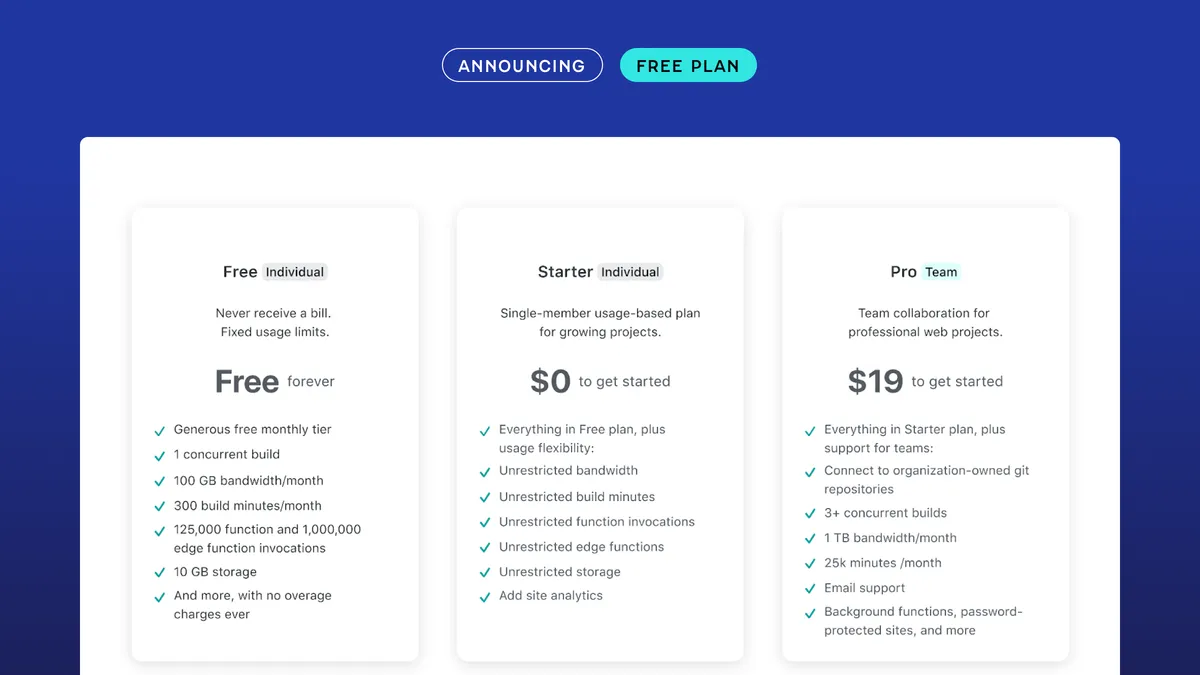
Free Hosting and “Forever Free” Plans
Some hosts or website builders offer free tiers with the expectation you’ll upgrade. Free plans often inject ads, restrict custom domains, or throttle performance. They’re useful for experiments but risky for any public-facing business site.

Low-End VPS and Economy Cloud Plans
Budget VPS/cloud instances advertise dedicated resources but often impose low I/O and CPU limits, or place low-priority “burstable” credits. These plans are better than shared hosting, but still limited for production workloads without careful configuration.
How Cheap Hosting Harms Performance and Conversions
Slow Page Load Times Reduce Conversions and Revenue
Performance correlates directly with conversion rates. Studies from Google and other industry analyses consistently show that each second of added page load time reduces conversions and increases bounce rate. Cheap hosts often skimp on SSD storage, server RAM, and caching layers—resulting in longer Time to First Byte (TTFB) and slower full page loads.
Uptime and Availability: Hidden Downtime Costs
Cheap hosts may offer 99% uptime on paper, but in practice performance and maintenance issues can increase downtime. For business sites, even a few hours of downtime means lost revenue, missed leads, and damage to brand credibility.
SEO Penalties from Poor Hosting
Search engines factor page speed, mobile performance, and site reliability into ranking algorithms. Slow or frequently unreachable sites will lose positions in search results over time—resulting in reduced organic traffic and higher acquisition costs.
Security Risks You Can’t Ignore
Poor Patch Management and Outdated Software
Budget providers may not offer managed updates or may delay patching server software. Over time, this increases the risk of compromise via known vulnerabilities in PHP, Apache/Nginx, or control panels.
Shared IPs and Bad Neighbors
Shared hosting often groups sites on the same IP. If one site is flagged for spam or serves malware, the entire IP can be blacklisted—hurting email deliverability and SEO trust.
Weak Backups and Recovery Options
Many low-cost plans either charge extra for backups or provide infrequent snapshot schedules. Without reliable backups, recovery from ransomware, accidental data deletion, or migration failures becomes expensive or impossible.
Operational and Support Limitations
Slow and Limited Support Channels
Cheap hosting providers rely on self-service knowledge bases and ticket queues. When your site has a critical issue—payment gateway outage, broken SSL, or a hacked site—slow support turnaround can cost far more than the monthly savings.
Feature Gaps That Add Hidden Costs
Low-cost tiers frequently omit features that teams need—staging environments, server-side caching, a CDN, managed databases, DDoS protection, and more. Adding these features a la carte or paying for third-party solutions often ends up costing more than choosing a mid-tier host with those features built-in.
Compliance and Data Privacy Concerns
Cheap hosts may not provide contractual assurances for data residency, GDPR compliance, HIPAA compatibility, or PCI-DSS requirements. For businesses handling payments, health data, or EU citizen data, non-compliance leads to legal risk and fines.
Long-Term Business Costs and Brand Damage
Lost Trust and Brand Erosion
Frequent downtime, slow pages, and security incidents erode customer trust. One data breach or several poor experiences can cause permanent damage to reputation, reducing lifetime customer value.
Migration Costs When You Outgrow Cheap Hosting
Growth forces migration. Moving from a low-cost provider to a scalable platform involves technical work, consultant fees, downtime risk, and sometimes the need to refactor the site. These one-time migration costs can dwarf the savings from years of cheap hosting.
How to Calculate the True Cost of Hosting
Compare hosting plans using total cost of ownership (TCO), not just monthly price. Include these factors:
Example calculation:
| Item | Monthly Cost |
|---|---|
| Base hosting | $5 |
| Backups (3rd party) | $10 |
| CDN | $20 |
| Estimated monthly downtime loss | $50 |
| Support/dev time (hours) | $200 (one-time or monthly) |
| Total effective monthly cost | $285+ |
In this simplified example, a $5 plan becomes cripplingly expensive when you factor in hidden costs.
How to Choose Hosting That Balances Cost and Value
Define Your Requirements First
Before comparing plans, list what your site actually needs: average monthly visitors, eCommerce or static content, expected traffic spikes, compliance needs, and required integrations. This avoids paying for unnecessary features and prevents under-provisioning.
Compare Key Metrics, Not Just Price
Run a Practical Test
Use a free trial or short-term plan to perform real-world tests:
Migration Best Practices If You Need to Upgrade
Plan the Migration with Clear Steps
Consider Professional Migration Help
If your site processes payments, has complex integrations, or is mission-critical, invest in an experienced migration engineer or the host’s migration service. The marginal cost often pays for itself by avoiding downtime and data loss.
Case Studies: When Cheap Hosting Backfires (and How It Was Fixed)
Case Study 1: eCommerce Store Hit by Traffic Spike
A niche eCommerce brand launched a marketing campaign expecting 5x traffic. Their shared hosting plan couldn’t handle the load—server CPU maxed, cart errors rose, and orders dropped by 30% during peak. They migrated to a managed cloud platform with autoscaling, caching, and a CDN. Result: site stayed online, conversion lifted 18%, and campaign ROI improved significantly.
Case Study 2: Blog Compromised After Outdated Software
A popular tech blog on a budget host was compromised via an unpatched CMS plugin. The site served malware and lost search rankings for weeks. The owners rebuilt on a managed WordPress host with automatic updates and WAF. Recovery took time and a PR effort, but future incidents were prevented.
Alternatives to Ultra-Cheap Hosting
Checklist: What to Ask Before You Buy Hosting
Internal and External Link Suggestions
FAQs: Quick Answers for Common Questions
Q: Is cheap web hosting okay for a small personal blog?
A: Yes, if you accept limitations. For hobby blogs with low traffic, cheap shared hosting is often sufficient. However, back up your site regularly and be prepared to upgrade if traffic or monetization grows.
Q: Will upgrading my hosting improve SEO?
A: Indirectly, yes. Better hosting improves page speed, uptime, and crawlability—factors that affect search rankings and user experience.
Q: How do I know when to upgrade from cheap hosting?
A: Upgrade when you see frequent 500 errors, slow load times during normal traffic, missed sales, or when compliance and security needs grow beyond the provider’s capability.
Image Alt Text Suggestions
Schema Markup Recommendations
Include Article schema with author, publishDate, headline, description, and mainEntityOfPage. Add organization schema for the publisher and FAQ schema for the Q&A section to increase chances of rich results.
Social Sharing Optimization
Conclusion: Invest in Hosting That Protects Revenue and Reputation
Cheap web hosting can be a tempting short-term saving, but the hidden costs—sl
about the author

Making sure your website stands out in the Great North.
