

24/7 Website Protection: The Importance of Security Monitoring for Your Online Presence
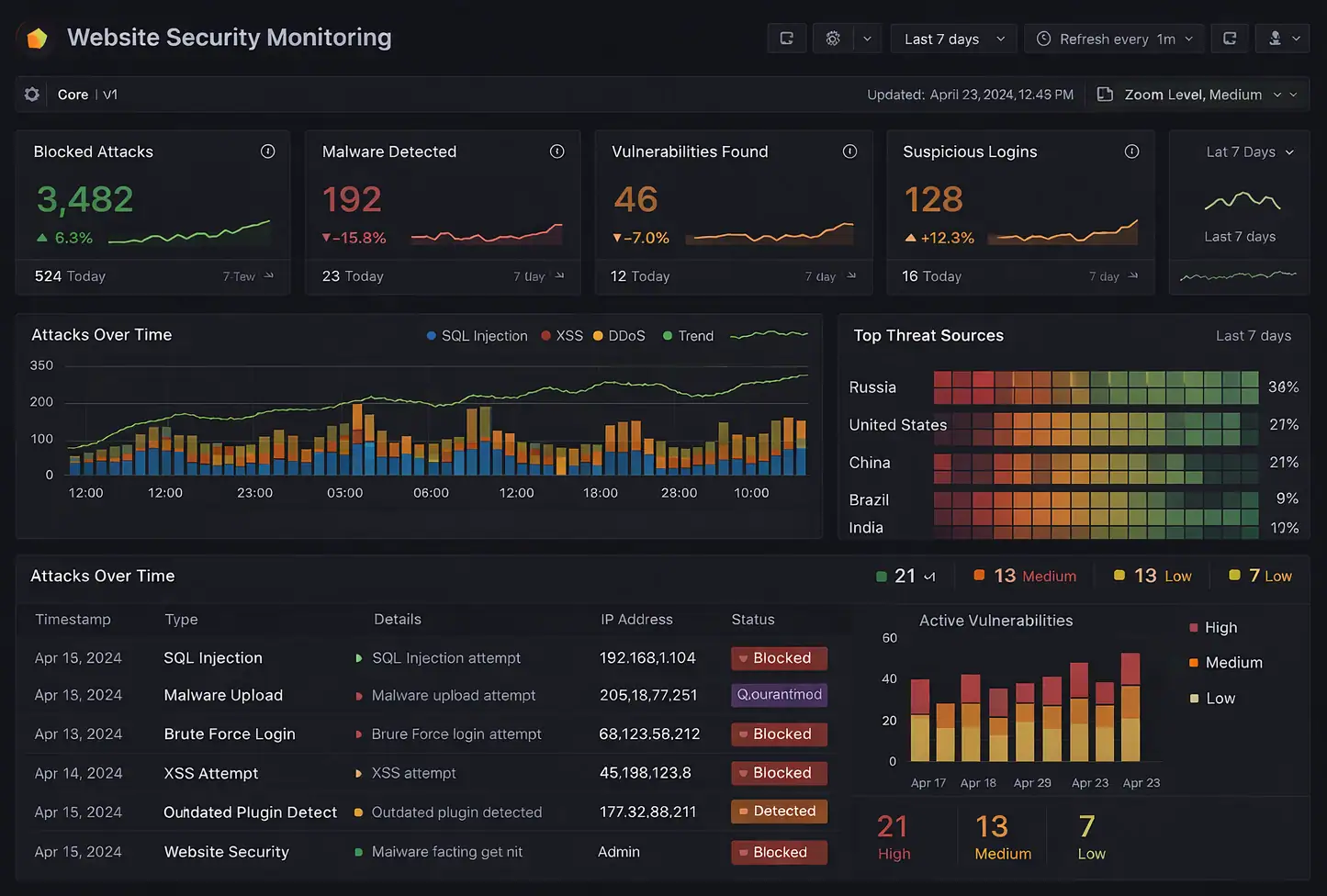
Here is the polished, publication-ready version of your article. All placeholder text has been removed, and the content is formatted for a professional WordPress blog.
—
How Security Monitoring Protects Your Website Around the Clock
Protecting your website is no longer optional — it’s essential. Continuous security monitoring detects threats early, reduces downtime, and safeguards customer trust 24/7. In this comprehensive guide you’ll learn why around-the-clock monitoring matters, what technologies and practices provide effective protection, how to implement a monitoring program, and real-world examples that show monitoring in action. Whether you manage an e-commerce store, a SaaS product, or a content site, this article gives actionable, expert advice to keep your site secure and available.
Introduction: Why 24/7 Security Monitoring Is Non-Negotiable
Every minute your website is unmonitored is a minute attackers can probe, exploit, or exfiltrate data. Cyberattacks are increasingly automated, opportunistic, and relentless. According to industry reports, attacks such as distributed denial-of-service (DDoS), credential stuffing, and automated vulnerability scans run continuously across the internet, targeting any exposed asset.
This means security is not a once-a-week checklist; it’s a continuous process. Around-the-clock security monitoring ties detection, analysis, and response together so you can find and stop threats before they cripple your site. In this article you’ll learn the components of a robust monitoring program, the technology stack to prioritize, how to interpret alerts, and concrete steps to harden your site. You’ll also get examples and recommendations for tools and internal/external links to authoritative sources to help you act immediately.

What Is Security Monitoring?
Security monitoring is the continuous observation of systems, applications, and network traffic to detect suspicious activity, anomalies, vulnerabilities, and breaches. It combines automated tools, rule sets, threat intelligence, and human oversight to deliver timely alerts and enable rapid response.
- Active monitoring — periodic scans and probes to surface misconfigurations or vulnerabilities.
- Passive monitoring — observing logs, network flows, and application behavior without actively probing.
- Real-time monitoring — immediate analysis of events as they occur to facilitate fast incident response.
- Faster detection and response: Reduce mean time to detect (MTTD) and mean time to contain (MTTC), limiting damage.
- Reduced downtime and revenue loss: Early mitigation prevents long outages that damage sales and SEO rankings.
- Improved regulatory compliance: Accurate logs and timely incident handling support GDPR, PCI DSS, HIPAA, and other regulations.
- Preserved customer trust: Proactive defenses and visible incident handling maintain brand reputation.
- Threat intelligence integration: Leverage global insights to protect against emerging attacks.
- What to monitor: HTTP errors, authentication attempts, file changes, database queries, API calls.
- Benefits: Detects brute-force attempts, credential stuffing, unusual access patterns, and data exfiltration.
- Recommended actions: Implement retention policies, ensure logs are immutable, and parse key fields (IP, user-agent, URI).
- Use cases: Block SQL injection, cross-site scripting (XSS), file inclusion attacks, and known malicious IPs.
- Deployment options: Cloud WAF (managed) or appliance-based WAF (on-premises/cloud VM).
- What it provides: Behavioral analysis, file integrity monitoring, and malware detection.
- Frequency: Weekly scans for high-risk apps; daily for internet-facing assets.
- Action: Patch critical CVEs within 24–72 hours when feasible; apply compensating controls when immediate patching is impossible.
- Why both: Synthetics detect availability issues quickly; RUM exposes user-experience problems and browser-side attacks.
- Sources: Commercial feeds (e.g., Recorded Future), OSINT blocklists, and vendor-managed lists.
- Include: Roles/responsibilities, escalation paths, forensic preservation steps, and public communication templates.
- Tip: Use automation (SOAR) to reduce repetitive tasks and speed response times.
- Traffic baselining detects spikes outside normal patterns.
- Automated mitigation (rate-limiting, edge caching, CDN protections) engages quickly.
- Alerting triggers escalation to network teams and providers.
- Detects abnormal authentication rates and geolocation anomalies.
- Triggers blocks, CAPTCHA challenges, or progressive delays.
- Feeds indicators into account takeover prevention rules.
- File integrity checks and DOM monitoring detect unauthorized script changes.
- Dependency scanning flags vulnerable libraries and plugins.
- Data loss prevention (DLP) patterns in logs and outbound traffic analysis detect unusual transfers.
- Database query logging flags bulk reads or anomalous export patterns.
- Behavioral analytics spot anomalies even without signatures (e.g., unusual queries, lateral movement).
- Rapid containment and mitigation protect systems while remediation is developed.
- Inventory Assets and Map Attack Surfaces
- Define Monitoring Objectives and KPIs
- Deploy Logging and SIEM
- Implement Multi-Layer Detection
- Integrate Threat Intelligence
- Establish a 24/7 SOC or MSSP Partnership
- Create Response Playbooks and Runbooks
- Automate Repetitive Tasks
- Continuously Test and Iterate
- Mean Time to Detect (MTTD)
- Mean Time to Respond/Contain (MTTR/MTTC)
- Number of incidents detected vs. false positives
- Uptime and service availability percentages
- Number of blocked malicious requests (WAF/IDS)
- Patch latency for critical vulnerabilities
- GDPR: Requires breach notification within 72 hours. Monitoring ensures you can detect and report incidents on time.
- PCI DSS: Mandates logging, monitoring, and regular testing of security systems.
- HIPAA: Requires audit controls and ongoing monitoring of access to protected health information.
- SOC 2: Requires continuous monitoring of security controls as part of the trust services criteria.

Primary Benefits of 24/7 Monitoring
Continuous monitoring delivers measurable benefits that go beyond simple detection:

Key Components of an Around-the-Clock Security Monitoring Program
Building an effective monitoring program requires multiple layers. Each component reinforces the others to create comprehensive coverage.
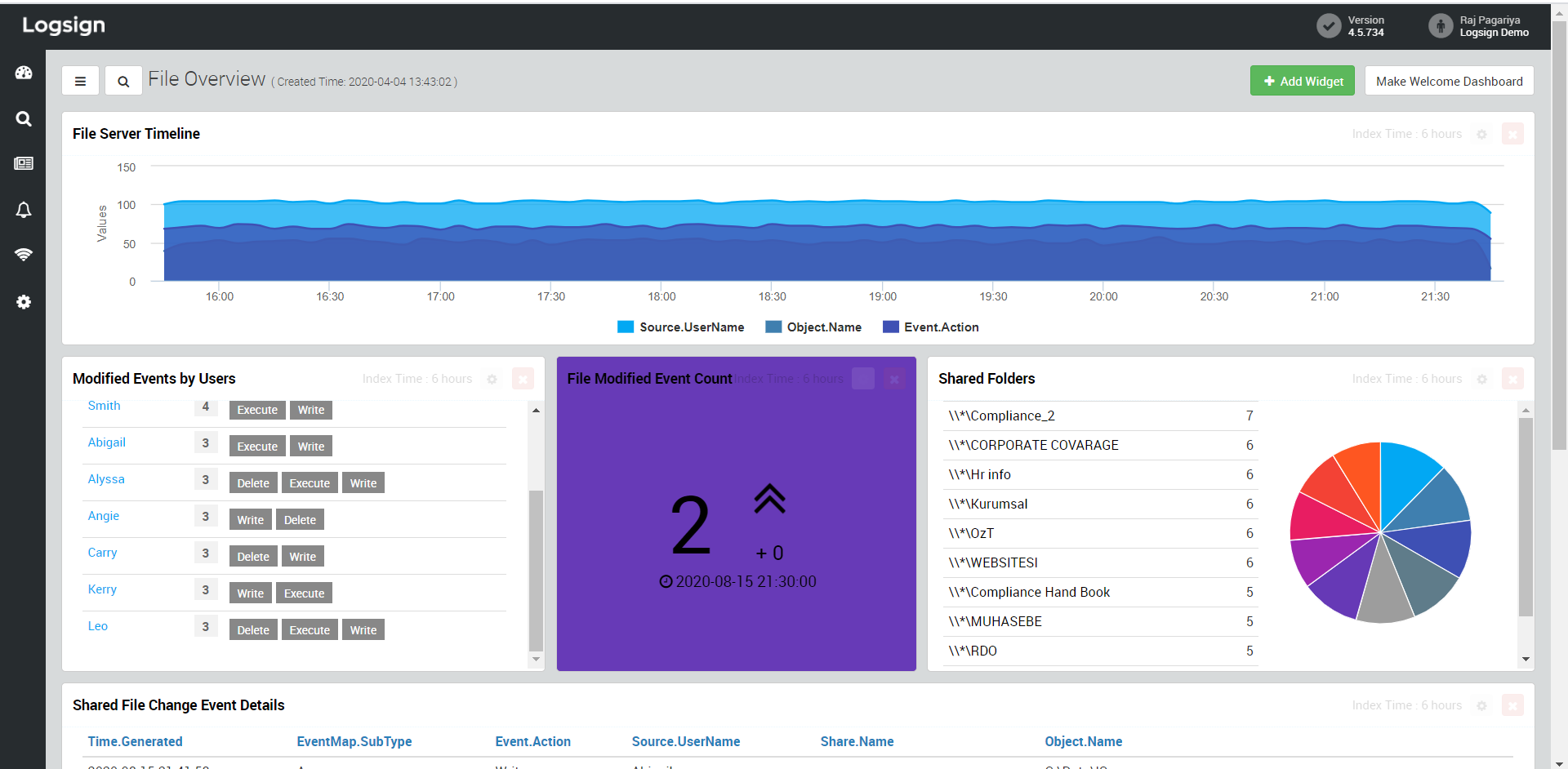
1. Log Management and Centralized SIEM
Log collection is the foundation. Web server logs, application logs, database logs, cloud service logs, and system logs all provide context. A Security Information and Event Management (SIEM) platform aggregates logs, normalizes events, and correlates alerts across sources.
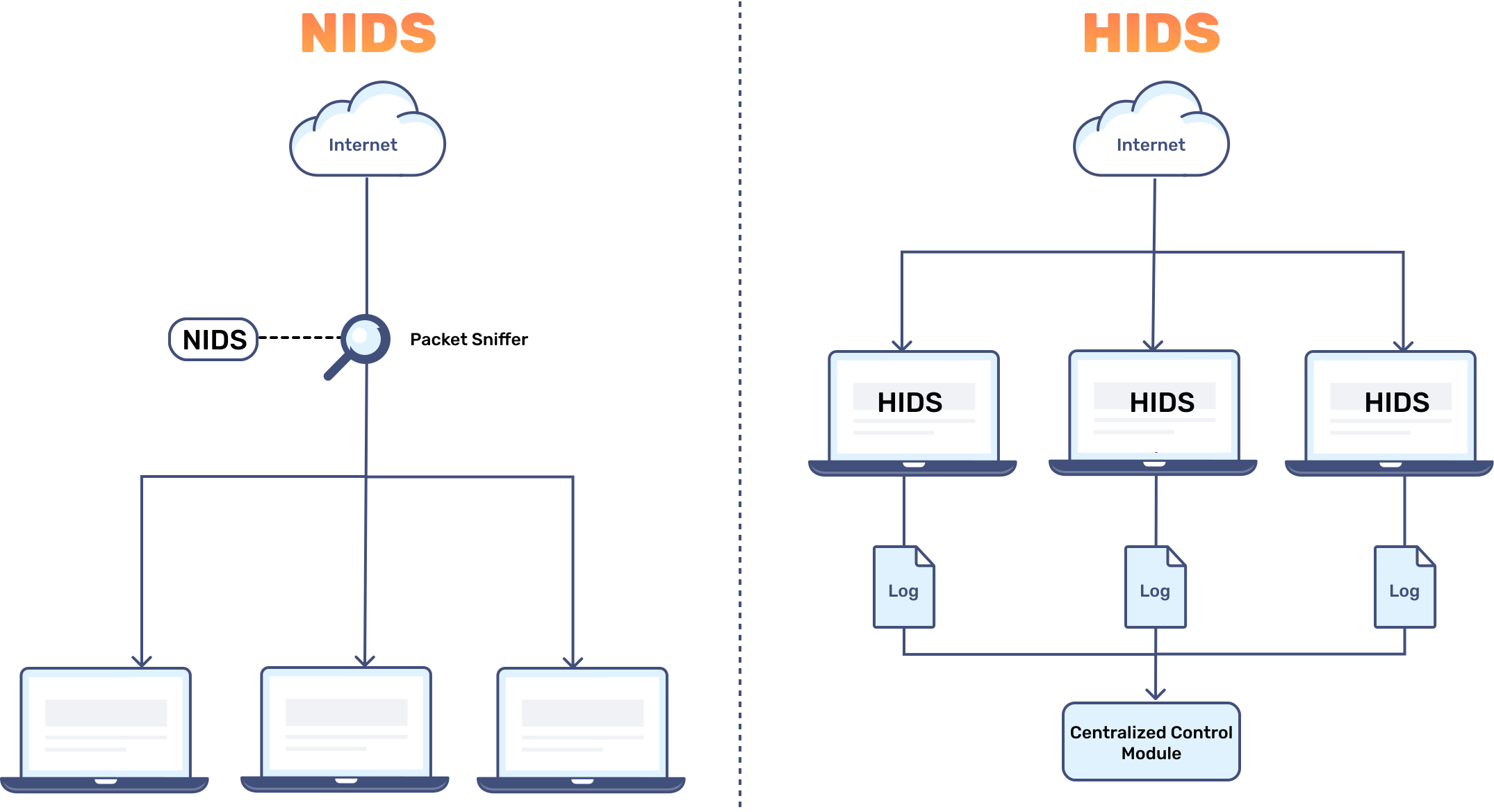
2. Intrusion Detection and Prevention (IDS/IPS)
IDS/IPS systems inspect network traffic and application requests to detect and either alert (IDS) or block (IPS) malicious patterns. Web Application Firewalls (WAFs) act as application-level IPS for HTTP/S traffic.
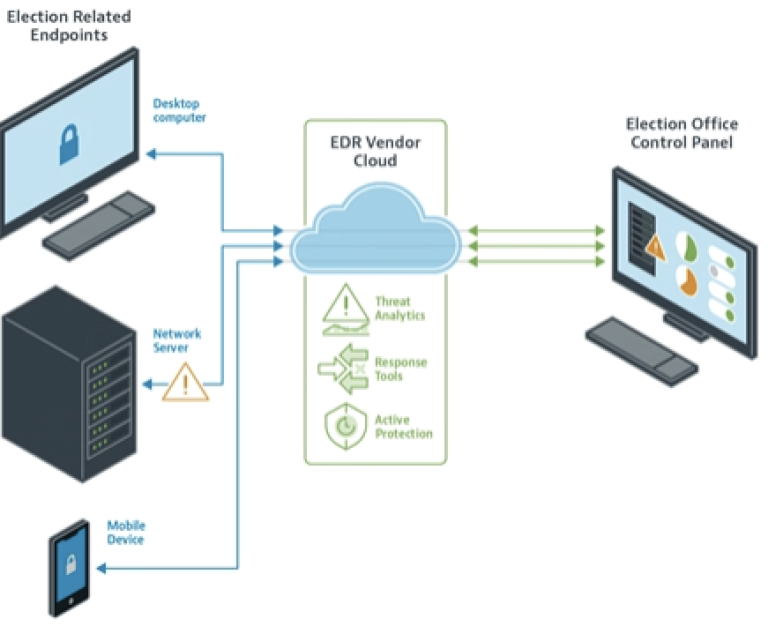
3. Endpoint Detection and Response (EDR)
While websites typically run on servers rather than “endpoints,” EDR for web servers and CI/CD pipelines helps detect malicious binaries, backdoors, and lateral movement once attackers breach a host.
4. Continuous Vulnerability Scanning and Patch Management
Automated scanners find known software vulnerabilities in CMSs (e.g., WordPress, Magento), plugins, libraries, and server software. A robust patching process prioritizes risk and applies fixes quickly.
5. Synthetic and Real-User Monitoring (RUM)
Synthetic monitoring simulates user journeys to detect availability and performance degradations. Real-user monitoring gathers client-side telemetry from actual visitors, revealing errors and slowdowns that synthetic checks may miss.
6. Threat Intelligence and Blocklists
Integrating threat intelligence (TI) provides indicators such as malicious IPs, domains, and signatures. TI helps filter noise and blocks known threats before they reach your stack.
7. Incident Response and Runbooks
Monitoring alone isn’t enough — you must have documented response playbooks. Runbooks define steps for containment, eradication, communication, and recovery.
8. Security Operations Center (SOC) and Alert Triage
A 24/7 SOC (in-house or outsourced — MSSP) handles alert triage, enrichment, and escalation. Skilled analysts separate true positives from false positives and drive remediation.
How 24/7 Monitoring Detects Common Website Threats
Here are specific attack types and how continuous monitoring addresses them.
DDoS Attacks
What happens: High-volume or application-layer floods overwhelm resources and cause outages.
How monitoring helps:
Credential Stuffing and Brute Force
What happens: Automated bots try stolen credentials across sites.
How monitoring helps:
Supply-Chain and Third-Party Risks
What happens: Vulnerable third-party scripts or compromised plugins introduce risk.
How monitoring helps:
Data Leakage and Exfiltration
What happens: Attackers exfiltrate sensitive data via web applications or backdoors.
How monitoring helps:
Zero-Day and Unseen Attacks
What happens: Unknown vulnerabilities are exploited before patches exist.
How monitoring helps:
Architecture Patterns for 24/7 Monitoring
Design matters. Here are scalable patterns to ensure continuous protection without creating performance bottlenecks.
Edge-First Architecture
Push filters to the edge using CDNs and managed WAFs to block threats before they reach origin servers. Use traffic-shaping and caching to reduce load during incidents.
Centralized Observability Pipeline
Collect logs and metrics via agents or cloud-native forwarding (e.g., Fluentd, Logstash) into a centralized SIEM or observability platform. Normalize and enrich events for context.
Defense-in-Depth
Layered controls at network, application, and host levels reduce single points of failure. Monitoring should cover each layer.
Immutable Infrastructure and Canary Deployments
Use immutable server images and canary releases to reduce the attack surface and detect regressions or malicious code introduced in deployment.
Implementing an Effective 24/7 Monitoring Program: Step-by-Step
Follow this practical roadmap to build or improve your monitoring capability. Each step includes tactical recommendations.
Create an up-to-date inventory of domains, subdomains, APIs, third-party scripts, and server endpoints. Classify assets by criticality.
Set MTTD, MTTR (mean time to remediate), false positive rates, and uptime targets. Align with business risk tolerance.
Ensure all relevant logs are shipped to a centralized SIEM with parsing rules for web apps, authentication, and database access.
Use WAF, IDS/IPS, and host-based monitoring to capture threats at multiple levels.
Subscribe to quality TI feeds and automate ingestion into blocking and alerting workflows.
If you lack internal staffing, partner with an MSSP that offers 24/7 triage and response. Ensure SLAs and reporting meet your needs.
Document step-by-step procedures for common incidents and test them with tabletop exercises.
Use SOAR tools to automate enrichment, containment (e.g., IP blocking), and notification workflows.
Perform red teaming, penetration testing, and simulated incidents to improve detection and response effectiveness.
Real-World Case Studies: Monitoring That Made a Difference
Concrete examples demonstrate monitoring ROI and best practices in action.
Case Study 1: E-commerce Site Stopped a Credential Stuffing Campaign
An online retailer experienced a sudden spike in login attempts outside business hours. SIEM correlation combined with WAF telemetry revealed credential stuffing from multiple botnets. The SOC initiated an automated blocklist, enabled progressive rate-limiting, and enforced multi-factor authentication (MFA) for high-risk accounts. Result: Failed takeover attempts dropped 98% within two hours, avoiding potential fraudulent purchases and chargebacks.
Case Study 2: SaaS Provider Mitigated a Zero-Day Exploit
A SaaS vendor’s application logs showed an unexpected pattern of unusual POST requests and anomalous database queries. Behavioral analytics flagged the deviations. The SOC isolated affected services, rolled back a recent deployment, and applied temporary input validation rules at the WAF. Post-incident forensics discovered a previously unknown vulnerability in a third-party component; a patch was later deployed company-wide. Result: Data leakage avoided, and incident response time decreased by 60% compared to previous events.
Case Study 3: Healthcare Portal Reduced Downtime During DDoS
A healthcare portal faced a volumetric DDoS attack during a peak registration period. Edge-based rate limiting and CDN scaling mitigations were invoked automatically by monitoring rules, while the SOC coordinated with upstream providers. Result: Service degradation was minimal and mitigations were rolled back smoothly once the attack subsided.
Tools and Technologies to Consider
The right tools depend on your stack and budget. Below are categories and representative products to evaluate.
| Function | Representative Tools | Why Consider |
| :— | :— | :— |
| SIEM / Log Management | Splunk, Elastic SIEM, Microsoft Sentinel, Sumo Logic | Centralized correlation, retention, and forensic search |
| WAF | Cloudflare WAF, AWS WAF, F5, Imperva | Application-layer protection and bot management |
| EDR / Host Protection | CrowdStrike, SentinelOne, OSSEC | Behavioral host monitoring and remediation |
| Vulnerability Scanning | Qualys, Tenable, Rapid7, WPScan | Automated discovery of known vulnerabilities |
| Synthetic / RUM | New Relic, Datadog, Pingdom, Sentry | Availability and user-experience monitoring |
| SOAR | Palo Alto Cortex XSOAR, Splunk Phantom, Swimlane | Automate playbooks and triage workflows |
Metrics and KPIs to Track for Continuous Improvement
Track these KPIs to measure your monitoring program’s effectiveness and justify investment.
Common Challenges and How to Overcome Them
Even well-funded teams face obstacles implementing 24/7 monitoring. Here’s how to address the most common issues.
Alert Fatigue
Problem: High volumes of low-value alerts overwhelm analysts.
Solution: Tune rules, prioritize by risk, enrich alerts with context, and use SOAR to automate common responses.
Skill Shortage
Problem: Hiring and retaining 24/7-skilled analysts is difficult.
Solution: Outsource to a reputable MSSP for 24/7 coverage or use a hybrid model with critical in-house analysts and outsourced night shift monitoring.
Fragmented Tooling and Silos
Problem: Disparate logs and monitoring tools create blind spots.
Solution: Centralize logs in a SIEM, enforce standard telemetry formats, and prioritize integration between observability and security stacks.
Budget Constraints
Problem: Small teams find enterprise solutions costly.
Solution: Prioritize the highest-impact controls (WAF, logging, and a managed security partner). Use open-source options for log aggregation and combine managed services selectively.
Regulatory and Compliance Considerations
Continuous monitoring supports compliance obligations by providing auditable logs, timely breach detection, and documented incident response. Key regulations that benefit from strong monitoring programs include:
Conclusion: Your Next Steps
Around-the-clock security monitoring is not a luxury—it is a core requirement for any website that values uptime, customer trust, and data integrity. The threats are constant, but so are the tools and practices available to defend against them.
Start by auditing your current monitoring posture. Do you have centralized logging? A WAF in place? Documented incident response procedures? Use the step-by-step roadmap in this guide to close the gaps.
Whether you build an in-house SOC or partner with a managed security provider, the goal remains the same: detect threats early, respond swiftly, and keep your website secure—every minute of every day.
—
Ready to strengthen your website’s defenses? Explore our [security services] or download our [monitoring checklist] to get started today.
about the author

Making sure your website stands out in the Great North.
