

The Ultimate Guide to Ongoing Website Security: Why Proactive Protection is Essential
Why Website Security Should Be Ongoing, Not Reactive: A Complete Guide to Proactive Protection
Primary keywords: website security, ongoing website security, proactive security
Every business with an online presence faces an unavoidable truth: attackers never stop. Cybercriminals continuously refine their tactics, and vulnerabilities emerge from software updates, third-party integrations, human error, and evolving threat landscapes. Treating website security as a reactionary task—patched only after a breach—exposes organizations to costly downtime, lost customer trust, regulatory penalties, and long-term brand damage. This article explains why website security must be ongoing rather than reactive, outlines the business and technical advantages of proactive programs, and provides a clear, actionable roadmap to build continuous security into your web operations.
Introduction: Why a Shift from Reactive to Ongoing Security Is Imperative
Imagine discovering your e-commerce site has been quietly siphoning customer credit card data for months. The immediate fallout—investigations, remediation costs, legal fees, and public relations crises—only tells part of the story. Long-term customer attrition, diminished market valuation, and compliance violations compound the damage. Reactive security addresses one incident at a time. Ongoing security anticipates incidents, reduces their probability and impact, and preserves trust.
In this article, you’ll learn the business case for ongoing website security, the technical practices that make it effective, real-world examples that demonstrate the difference, and a practical step-by-step plan to move from reactive to continuous protection. Whether you’re a small business owner, CTO, site administrator, or security-conscious stakeholder, this guide gives you the strategies and checklists needed to secure your site continuously and measurably.

Why Reactive Security Fails: Costs, Risks, and Missed Opportunities
1. Financial Costs Are Exponential
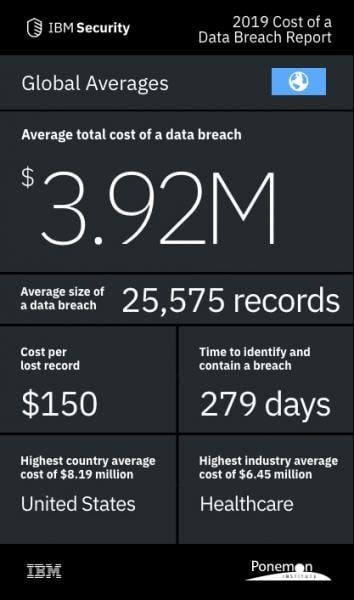
Responding to a breach is more expensive than preventing one. Immediate remediation includes incident response teams, forensics, legal counsel, and communication. There are also indirect costs: lost sales during downtime, customer compensation, fines for regulatory non-compliance, and increased insurance premiums.
- Average breach costs rise with time to detection and containment.
- SMBs often face higher relative impact because they lack reserves and scale.
- Use SCA (Software Composition Analysis) to track third-party libraries and dependencies.
- Subscribe to vendor advisories and threat intelligence feeds for zero-day alerts.
- Assess Current State: Inventory assets (sites, servers, third-party plugins), map data flows, and identify critical assets.
- Define Risk Appetite and SLAs: Establish acceptable risk levels and remediation SLAs for critical, high, medium, and low vulnerabilities.
- Automate Monitoring and Scanning: Deploy vulnerability scanners, central logging, and alerting tools.
- Establish Patch Management: Schedule automated patch windows and maintain staging environments for testing.
- Deploy Preventative Controls: Configure WAFs, MFA, RBAC, and encryption for data at rest and in transit.
- Integrate Security into DevOps: Add SAST/DAST to CI/CD pipelines and require security sign-offs before deployment.
- Document and Practice IR: Create incident playbooks and run regular tabletop exercises.
- Train Staff and Conduct Phishing Tests: Make security awareness part of onboarding and ongoing training cycles.
- Review and Iterate: Conduct quarterly security reviews, update policies, and refine controls based on metrics and incident lessons learned.
- Check backup job status and integrity reports.
- Review WAF and intrusion prevention events for false positives and tuning.
- Apply critical patches in staging and schedule production rollout.
- Review third-party component updates and advisories.
- Run internal penetration tests focused on recent changes.
- Update and review incident response playbooks.
- Conduct phishing simulations and staff training refreshers.
- Review SLAs, KPIs, and security roadmap progress.
- Mean Time to Remediate (MTTR): Measure time from discovery to full remediation.
- Percentage of systems patched within SLA.
- Number of critical/high vulnerabilities open over time—should trend downward.
- Phishing click rate—should decline after training.
- Uptime and Mean Time Between Failures (MTBF) for critical services.
- Vulnerability Scanners: Nessus, Qualys, OpenVAS
- SCA: Snyk, WhiteSource, Dependabot
- SAST/DAST: SonarQube, Checkmarx, Burp Suite
- WAF/CDN: Cloudflare, AWS WAF, Imperva
- Logging & SIEM: Splunk, Elastic Stack, Azure Sentinel
- MFA and IAM: Okta, Auth0, AWS IAM with MFA
- Backup & DR: Veeam, AWS Backup, managed database snapshots
- MSSPs & Managed Detection: CrowdStrike, Arctic Wolf, Datadog Security

2. Reputation and Trust Are Fragile
Customers value security and privacy. A single breach can destroy customer trust. Rebuilding a reputation is slow and costly, often requiring incentives, sustained communication, and demonstrable improvements—none of which are guaranteed to restore prior levels of loyalty.
3. Regulatory and Legal Exposure
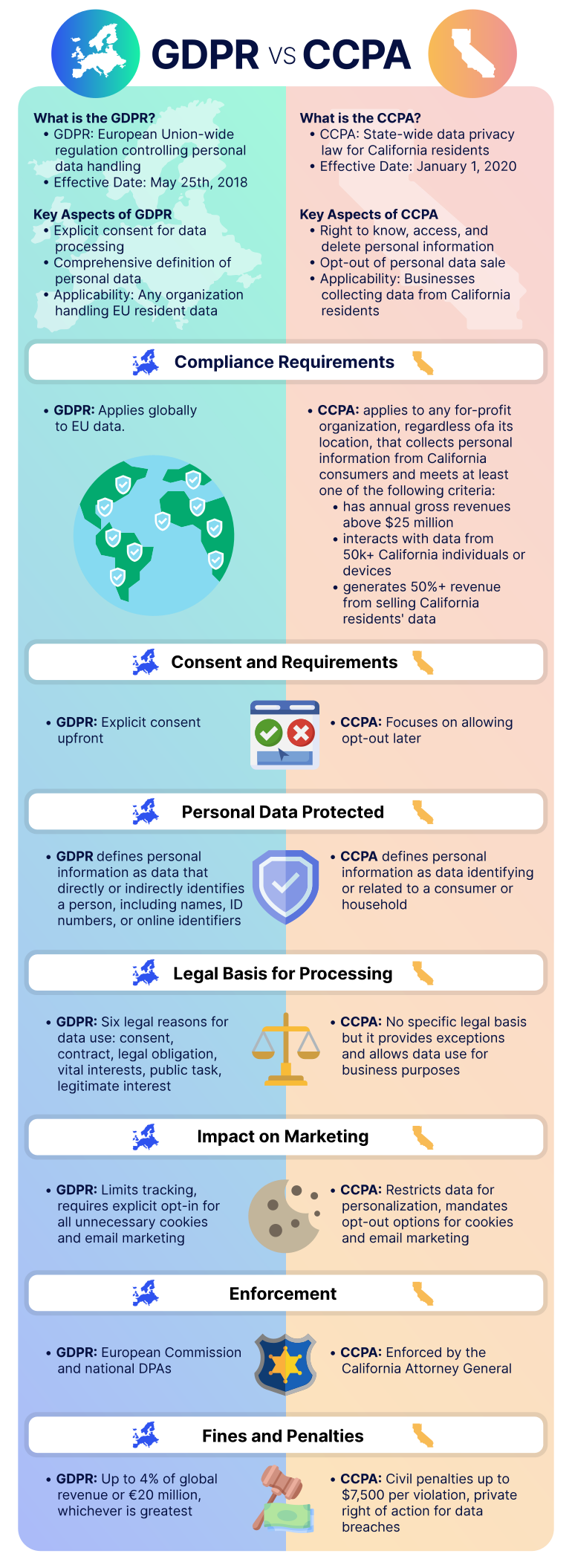
Data protection regulations like GDPR, CCPA, and sector-specific standards (e.g., PCI DSS, HIPAA) require continuous compliance measures. Reactive responses often fail to meet these standards, resulting in fines and legal action.
%20(1).webp)
4. Attackers Exploit Time Windows
Many breaches occur through known vulnerabilities or misconfigurations that went unpatched for weeks or months. Once a vulnerability is disclosed publicly, automated exploit tools rapidly reduce the safe window for unpatched systems.

Benefits of Ongoing Website Security
1. Reduced Risk and Faster Recovery
Continuous monitoring and patching shrink the window of exposure. When incidents do occur, a mature incident response plan and practiced runbooks enable faster containment and recovery, minimizing business impact.
2. Predictable Costs and Better Budgeting
Investing in continuous security shifts spending from unpredictable incident responses to scheduled operations—patch management, vulnerability scanning, and staff training—enabling better financial planning and ROI analysis.
3. Better Customer Trust and Competitive Advantage
Security-conscious buyers favor vendors who can prove continuous security practices. Ongoing security is a market differentiator and supports sales, partnerships, and customer retention.
4. Compliance and Audit Readiness
Continuous security simplifies compliance: logging, access controls, and documented processes make audits routine rather than crisis-driven events.
Core Components of an Ongoing Website Security Program
Turning security into an ongoing practice means integrating people, processes, and technology. Below are the essential components that together create a robust continuous-security posture.
1. Continuous Vulnerability Management
Run automated vulnerability scans regularly (weekly or daily for critical assets) and perform periodic authenticated scans. Prioritize findings using risk-based scoring and remediate on a defined SLA (e.g., critical: 24-72 hours).
2. Regular Patch Management
Automate patch deployments for CMS platforms, plugins, server OS, and runtime environments. Test patches in staging environments before production rollout and maintain rollback plans.
3. Continuous Monitoring and Logging
Implement centralized logging (SIEM) for web servers, application logs, and access events. Use alerting rules to detect abnormal behavior: spikes in traffic, login failures, file changes, or data exfiltration patterns.
4. Web Application Firewalls (WAF) and Runtime Protection
Deploy a WAF with tuned rules to block common attacks (SQLi, XSS). Consider RASP (Runtime Application Self-Protection) for in-app detection and response in real time.
5. Automated Backups and Recovery Testing
Automate daily backups and maintain offsite copies. Regularly test restore procedures to ensure integrity and acceptable recovery time objectives (RTO) and recovery point objectives (RPO).
6. Least Privilege and Access Controls
Enforce role-based access control (RBAC), multi-factor authentication (MFA), periodic access reviews, and just-in-time access for administrators. Limit third-party service permissions.
7. Secure SDLC and Code Reviews
Integrate security into the development lifecycle with static application security testing (SAST), dynamic testing (DAST), and code reviews. Shift-left testing finds issues earlier when they’re cheaper to fix.
8. Incident Response and Tabletop Exercises
Document an incident response plan, define roles and communication protocols, and run tabletop exercises quarterly to keep teams prepared and processes refined.
9. Employee Training and Phishing Simulations
Human error causes many breaches. Conduct ongoing security awareness training, simulated phishing campaigns, and role-specific education for developers, admins, and customer-facing staff.
10. Third-Party Risk Management
Continuously assess vendors and third-party services for security posture. Require security SLAs and regular attestations. Monitor supply-chain vulnerabilities proactively.
Implementation Roadmap: From Reactive to Ongoing Security
Transitioning to continuous security is a program, not a one-time project. The following roadmap provides a prioritized, practical path forward.
Each stage should include measurable KPIs: mean time to detection (MTTD), mean time to remediation (MTTR), number of open critical vulnerabilities, percentage of systems patched within SLA, and phishing click-through rates.
Real-World Examples: How Ongoing Security Prevents Catastrophe
Case Study 1: E-commerce Site Prevents Data Theft with Continuous Patching
A mid-sized retailer implemented weekly vulnerability scans and automated patching for its CMS and payment plugins. An exploited plugin vulnerability was identified and patched within 48 hours—before attackers automated exploits could scan the internet. The proactive posture prevented data theft and avoided regulatory fines.
Case Study 2: SaaS Company Reduces Downtime Through Monitoring
A SaaS provider deployed centralized logging and anomaly detection. When an attacker began probing APIs, the security team observed unusual authentication failures and throttled IP addresses. Quick containment prevented data exfiltration and preserved uptime for customers.
Case Study 3: Startup Saves Reputation with Regular Backups and IR Drills
After a ransomware attempt encrypted a staging server, the company restored services from tested backups within hours. Because they had practiced incident response and customer communications, they minimized customer impact and preserved market confidence.
Common Objections and How to Overcome Them
“It’s Too Expensive”
Reactive remediation costs frequently exceed preventive budgets. Ongoing security can be scaled to business size with prioritized controls. Start with high-impact, low-cost measures: MFA, automated backups, and basic WAF rules.
“We Don’t Have the Expertise”
Many managed security providers (MSSPs) and cloud-native services offer continuous security as a subscription. Outsourcing allows organizations to adopt best practices without hiring large in-house teams.
“We Haven’t Been Breached—Why Change?”
Absence of evidence is not evidence of absence. Many breaches go undetected for months. Ongoing security is insurance that preserves business continuity and customer trust.
Practical Checklists: What an Ongoing Website Security Program Looks Like
Daily Tasks
* Monitor security alerts and critical logs.
Weekly Tasks
* Run automated vulnerability scans and triage findings.
Monthly Tasks
* Conduct access reviews and revoke unnecessary privileges.
Quarterly Tasks
* Perform comprehensive penetration tests by external vendors.
KPIs and Metrics to Prove Ongoing Security Works
* Mean Time to Detect (MTTD): Lower is better—aim for days, ideally hours for critical incidents.
Technical Recommendations and Tools
Choose tools that integrate well with your tech stack and provide automation, visibility, and reporting. Consider the following categories and examples (not exhaustive):
Choose services that support APIs for automation and integrate with your incident management and CI/CD pipelines.
FAQ — Quick Answers for Featured Snippets
Q: What does ongoing website security mean?
Ongoing website security is a continuous program that includes monitoring, vulnerability management, regular patching, access control, backups, and incident response—designed to prevent, detect, and quickly respond to threats.
Q: How often should a website be scanned for vulnerabilities?
Critical assets should be scanned daily or weekly; full authenticated scans can be scheduled weekly or monthly depending on change frequency. Automated alerts for critical CVEs should be in place.
Q: Can small businesses afford ongoing website security?
Yes. Start with essential low-cost measures (MFA, backups, WAF rules, automated updates) and scale with managed services or MSSPs as needed. Preventive costs are typically lower than reactive breach costs.
Measuring Success and Next Steps
To prove the value of ongoing security, track KPIs and report improvements quarterly. Use dashboards for MTTD, MTTR, patching percentages, and phishing rates. Tie these metrics to business outcomes: reduced incident costs, improved uptime, and customer satisfaction.
Next steps to implement an ongoing program:
Conclusion: Make Security a Continuous Business Priority
Website security is not a checkbox or an emergency fire drill. It’s a continuous responsibility that protects revenue, reputation, and regulatory compliance. Moving from reactive to ongoing security reduces risk, lowers long-term costs, and builds customer trust. Start small, measure continuously, and iterate: prioritize critical assets, automate wherever possible, and make security a shared responsibility across development, operations, and leadership.
Key takeaway: Ongoing website security transforms security from a costly, unpredictable liability into a strategic business enabler—protecting customers, preserving trust, and ensuring operational resilience.
Action step: Schedule a 30-minute security review with your team this week to inventory assets and set your first patching and monitoring priorities.
about the author

Making sure your website stands out in the Great North.
