

The Ultimate Guide to Crafting a Strong Website Backup Strategy: Safeguard Your Online Presence effectively
Here is the polished, publication-ready version of your article. All placeholder text has been removed, and the content is formatted for a professional WordPress blog while preserving your original structure and Markdown.
—
What a Good Website Backup Strategy Should Include: A Complete Guide to Protecting Your Online Presence
Every website owner must treat backups as insurance: invisible until you need them, priceless when you do. Whether you run a personal blog, an e-commerce store, or a mission-critical corporate site, a robust backup strategy turns catastrophic downtime, data loss, or security breaches into manageable incidents. This guide explains exactly what a good website backup strategy should include, how to implement each element, and practical tips to ensure your site can be restored quickly and reliably.
Introduction: Why a Strategic Approach to Website Backups Matters
Imagine losing months of customer orders, product data, or carefully crafted content because of a single server failure or ransomware attack. According to recent industry data, more than 50% of small businesses that experience major data loss never fully recover. Backups aren’t just copies of files — they’re the backbone of business continuity, customer trust, and regulatory compliance. In this article you’ll learn the essential components of a solid backup strategy, step-by-step implementation techniques, recovery testing practices, and recommendations for tools, storage, and policies that align with real-world needs. By the end, you’ll be equipped to design a backup plan that minimizes risk, meets legal obligations, and restores your site fast when disaster strikes.

Core Principles of an Effective Backup Strategy
A reliable backup strategy follows a few non-negotiable principles. Adopt these as the foundation of your plan.
- Regularity: Backups must run on a reliable schedule that reflects how often your site changes.
- Redundancy: Multiple copies across distinct locations reduce single points of failure.
- Security: Encrypted backups and secure transfer protect sensitive data.
- Integrity: Backups must be validated to ensure they are usable when needed.
- Retention: A sensible retention policy balances recovery flexibility with storage costs.
- Automation: Automated processes reduce human error and ensure consistency.
- Testability: Regular restore tests verify your plan actually works.
- Website files: HTML, CSS, JavaScript, images, theme files, plugin files and custom code.
- Databases: All database contents (e.g., MySQL, PostgreSQL) including users, orders, and content.
- Configuration files: Server configs (nginx/apache), .htaccess, environment variables, DNS zone files.
- User data: Uploaded media, avatars, attachments, and user-generated content.
- Emails and logs: Transactional emails, system logs, and audit trails required for troubleshooting or compliance.
- Third-party integrations: API credentials, OAuth tokens, and exported settings from SaaS services when applicable.
- Certificates and licenses: SSL/TLS certificates, license keys, and any signed assets needed to operate the site.
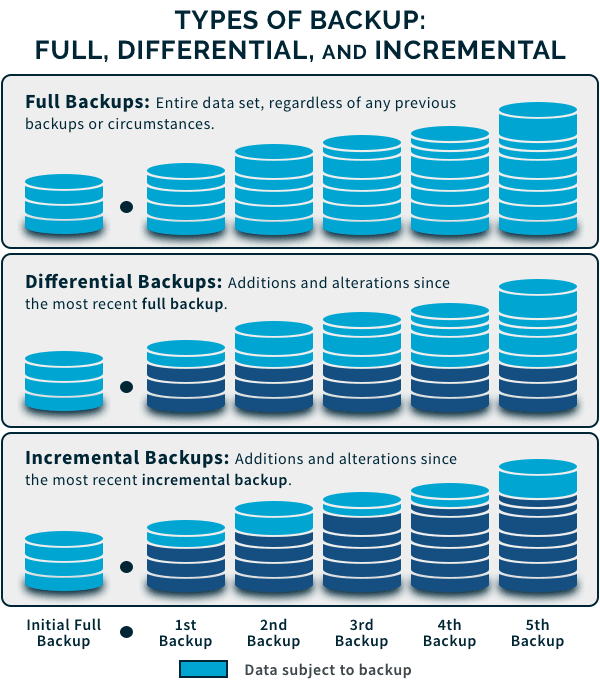
- Full backups: A complete snapshot of your site and data. Easiest to restore but storage-intensive.
- Incremental backups: Capture only changes since the last backup. Storage-efficient and faster to run.
- Differential backups: Capture changes since the last full backup. Middle ground between full and incremental.
- Continuous data protection (CDP): Real-time or near-real-time replication for minimal data loss.
- High-change, high-value sites (e-commerce, active SaaS): use hourly incremental backups + daily full backups.
- Moderate-change sites (news sites, active blogs): use daily incremental + weekly full backups.
- Low-change sites (static brochure sites): weekly full backups may suffice, with daily snapshots if feasible.
- Primary storage: Local server or SAN for quick access and fast restores.
- Offsite/cloud storage: AWS S3, Google Cloud Storage, Azure Blob Storage, Backblaze B2 — for resilience and geographic separation.
- Cold storage/archive: For long-term retention of historical backups (legal/compliance), use lower-cost tiers with lifecycle policies.
- Immutable storage: WORM/immutability options to protect against ransomware deletion.
- Encryption: Use AES-256 or better for data at rest and TLS for data in transit.
- Access control: Employ least-privilege access, role-based permissions, and multi-factor authentication (MFA) for backup management.
- Network isolation: Use VPCs, firewall rules, or private endpoints for backup traffic.
- Immutable backups: Enable immutability or write-once-read-many (WORM) settings in cloud storage to prevent tampering.
- Audit logging: Keep detailed logs of backup creation, access, and restores for compliance and incident response.
- Automated schedules: Use cron, CI/CD pipelines, or backup software to automate full/incremental backups.
- Monitoring: Implement alerts for failed backups, size anomalies, or missed schedules via email, Slack, or PagerDuty.
- Health checks: Periodically verify backup integrity, test restore steps, and ensure backup logs are retained.
- Versioning: Keep multiple historical versions to protect against accidental deletion or bad deployments.
- Restore drills: Run full restores into a staging environment at least quarterly (monthly for mission-critical sites).
- File and DB integrity checks: Verify checksums and run database consistency checks after restore.
- Recovery Runbooks: Maintain clear, step-by-step runbooks for restore procedures, including contact lists and escalation paths.
- RTO validation: Measure how long restores actually take and adjust RTO/backup strategies accordingly.
- Short-term retention: Keep hourly/daily backups for a few days to weeks to recover from recent mistakes.
- Mid-term retention: Keep weekly backups for a month or two for rollbacks and audits.
- Long-term retention: Keep monthly/quarterly backups for a year or longer for legal/compliance reasons.
- Automated lifecycle rules: Use storage lifecycle policies to transition older backups to cheaper tiers or delete them per policy.
- Failover infrastructure: Hot standby or cold standby environments ready to assume traffic.
- DNS and Traffic Management: Low TTL DNS entries and traffic routing (CDN, load balancers) to move traffic quickly.
- Data replication: Synchronous or asynchronous replication for databases when near-zero RPO is required.
- Communication plan: Customer notifications, status pages, and internal communication templates to be used during incidents.
- Back up wp-content, themes, plugins, uploads, and the MySQL database.
- Use plugins or managed hosting backups (e.g., UpdraftPlus, VaultPress) with offsite storage integration.
- Whitelist backup endpoints and ensure plugin updates don’t overwrite backup settings.
- SaaS platforms often limit direct file access; use third-party exporters or the provider’s backup options.
- Export product catalogs, order history, and customer lists via API regularly.
- Automate DB dumps, asset storage backups, and config snapshots via CI/CD.
- Containerized apps should back up persistent volumes and container images, plus orchestration manifests.
- Managed hosting with daily backups (offsite): hoster-provided backups + plugin for site snapshots.
- Cloud storage: Backblaze B2 for offsite copy with lifecycle rules.
- Restore testing: Quarterly manual restore to staging.
- Automated hourly incrementals (for orders) + daily full backups. Use a managed backup service that supports DB and file-level restores.
- S3 or equivalent with cross-region replication and immutability enabled.
- Automated monitoring + on-call alerts for failed backups.
- Multi-region replication, synchronous replication for critical DBs, continuous backups, and immediate failover capabilities.
- Immutable storage, strict access controls, and encrypted end-to-end backups.
- Regular DR exercises with documented RTO/RPO measurements and executive reporting.
- Ownership: Assign a backup owner responsible for strategy, testing, and compliance.
- Change management: Include backups in deployments to ensure new components are captured.
- Data classification: Apply different backup/retention rules for PII, financial records, and non-sensitive content.
- Incident response: Integrate backup restore steps into your incident response plan.
- Use incremental backups to reduce storage consumption.
- Leverage lifecycle policies to move older backups to cheaper tiers (e.g., AWS Glacier).
- Set retention rules based on legal requirements to avoid unnecessary long-term storage.
- Choose compression and deduplication to reduce storage footprint.
- Encrypting backups that contain personal data to meet GDPR, HIPAA, or other privacy laws.
- Maintaining auditable logs of backup creation and access.
- Keeping backups within required geographic regions if data residency laws apply.
- Implementing data minimization and retention policies aligned with legal retention periods.
- Comprehensive inventory of files, databases, configs, and certificates.
- Defined RPO and RTO matched to business needs.
- Automated full and incremental backups on a schedule.
- Offsite, encrypted copies with immutability where needed.
- Access controls, MFA, and audit logging for backup systems.
- Regular restore testing and validated runbooks.
- Clear retention and lifecycle policies.
- Disaster recovery plan integrating backups with failover and communication steps.
- Governance, ownership, and change management for backups.
- Cost optimization through lifecycle, compression, and deduplication.
- “Website security best practices” — link to your site’s security or IT policy page.
- “Disaster recovery plan template” — link to a downloadable resource or internal DR documentation.
- “Managed hosting options” — link to a comparison page on your site describing hosting tiers.
- OWASP: https://owasp.org — for security best practices and guidelines.
- NIST SP 800-34: https://csrc.nist.gov — guidance on contingency planning and backups.
- GDPR guidance: https://gdpr.eu — for data protection and retention considerations.
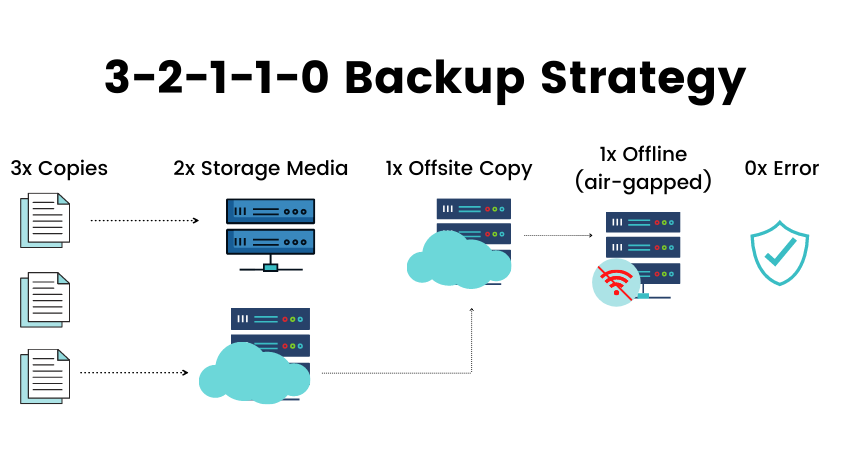
- Diagram of 3-2-1 backup strategy — Alt: “3-2-1 backup rule diagram showing local, offsite, and multiple copies.”
- Flowchart of backup schedule and retention lifecycle — Alt: “Backup schedule flowchart with daily, weekly, and monthly retention.”
- Sample restore dashboard screenshot — Alt: “Backup restore dashboard showing past backups and restore options.”
What to Back Up: Comprehensive Data Inventory
Start by cataloging everything necessary to fully restore website functionality and data. Backups should include:
Backup Types and Scheduling (RPO & RTO Considerations)
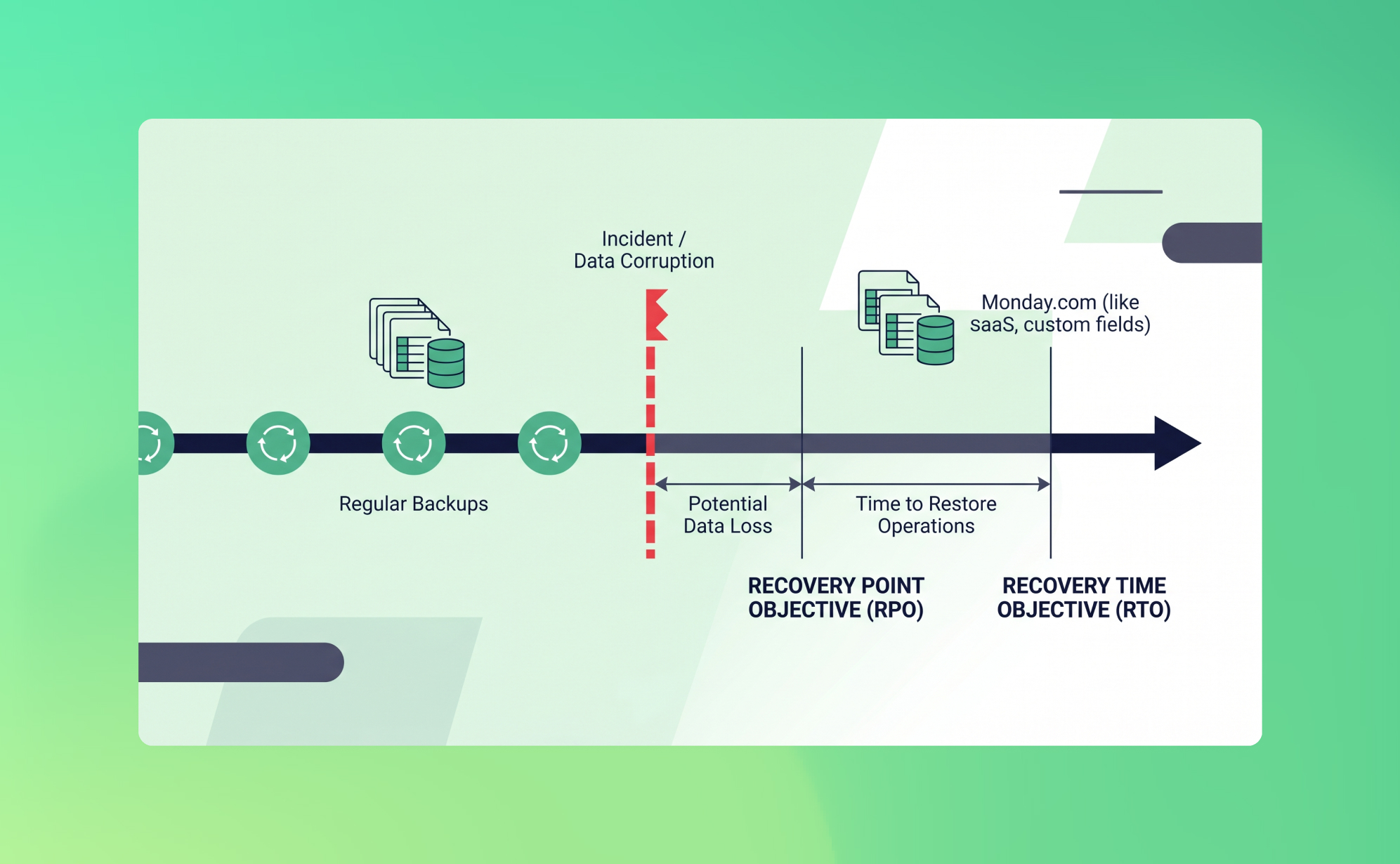
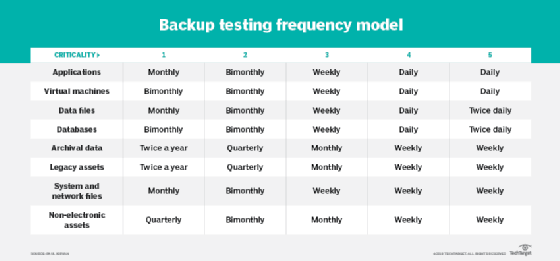
Select backup types and schedules that align with your Recovery Point Objective (RPO) and Recovery Time Objective (RTO).
Backup types
Scheduling guidelines
Set RPO based on how much data loss you can tolerate (e.g., 1 hour, 24 hours) and RTO based on acceptable downtime. These metrics guide the frequency and type of backups.
Storage Strategy: Where to Keep Backups
Location matters. Follow the 3-2-1 rule: three copies of data, on two different media types, with one copy offsite.
Encrypt backups at rest and in transit. Use separate credentials and access controls for backup storage — don’t reuse production credentials.
Security Measures for Backups
Backups are sensitive because they often contain everything about your business. Secure them accordingly.
Automation and Monitoring
Manual backups are error-prone. Automate the process and monitor it continuously.
Testing and Validation: How to Ensure Backups Work
A backup not tested is a liability. Schedule regular tests to confirm backups are restorable and complete.
Retention Policies: How Long to Keep Backups
Retention balances compliance, recovery needs, and cost. Define policies by data type and business need.
Disaster Recovery Planning: Beyond Backups
Backups are only one piece of disaster recovery (DR). A comprehensive plan includes failover, DNS strategies, and business continuity measures.
Special Considerations for Common Platforms
Here are platform-specific tips to ensure your backup strategy fits the technology you use.
WordPress
Shopify / SaaS Platforms
Custom web applications
Tool Recommendations and Example Architectures
Choose tools that match your scale and requirements. Example stacks for different needs:
Small business / personal sites
Growing e-commerce sites
Enterprise / mission-critical
Operational Policies and Governance
Policies formalize how backups are handled across your organization. Include:
Cost Management: Balancing Protection vs. Expense
Backups cost money. Optimize without compromising safety.
Legal, Compliance, and Privacy Considerations
Regulatory obligations influence backup design. Ensure compliance by:
Checklist: Key Elements Every Good Backup Strategy Should Include
Real-World Case Study: How Backups Saved an Online Store
An online retailer suffered a database corruption after a faulty plugin update. Because they had hourly incremental backups and daily full backups stored offsite with immutable retention, the team restored the database to the state 45 minutes before the incident. The site was fully operational within 90 minutes, mitigating lost sales and preserving customer trust. The incident reinforced their retention and testing cadence — they moved to automated hourly validation checks and quarterly restore drills.
Frequently Asked Questions (FAQ)
How often should I test my backups?
At minimum, test restores quarterly for non-critical sites and monthly for critical sites. After any major change (architecture, vendor, or compliance requirement), run an additional test.
Are cloud provider backups enough?
Provider backups are useful but not a substitute for an independent offsite copy. Use at least one separate copy under your control to avoid vendor lock-in or accidental deletions.
What is immutable storage and do I need it?
Immutable storage prevents modification or deletion of backups for a set retention period, protecting against ransomware and malicious deletion. Use it when backups contain critical or irreplaceable data.
How long should backups be kept?
Align retention with business and legal needs: short-term (days/weeks) for operational recovery, mid-term (months) for audits and rollbacks, and long-term (years) for compliance.
Internal and External Link Recommendations
To improve site architecture and SEO, include internal and external links. Suggested internal anchor text and targets:
Authoritative external sources to cite (open in new window):
Image Suggestions and Alt Text
Schema Markup Recommendation
Use Article schema with fields: headline,
about the author

Making sure your website stands out in the Great North.
